Here’s the deal: WhatsApp story “delivery” isn’t about ticks—it’s confirmed only when someone actively watches. Swipe up the eye icon to see exactly who viewed your 24-hour story. Unlike messages, delivery = viewed. Privacy settings determine who sees your updates, and stories vanish forever after a day. No guessing games: either they watched it, or they didn’t. Simple, right? 😉
Ever posted a WhatsApp Status 🤔 and spent hours wondering who actually saw it? You’re not alone. Unlike message ticks (those grey and blue checkmarks), WhatsApp story delivery works differently—it’s all about views, not technical “delivered” signals. This guide breaks down the confusion, explaining why your story only shows as “delivered” once someone actively watches it 👀. Want to know how to check exactly who’s peeking? We’ll cover the eye icon trick, 24-hour story lifespan, and why privacy settings might hide those views. By the end, you’ll crack the code on tracking your story’s reach ✅—no tech jargon, just simple steps.
Decoding WhatsApp Story Delivery: What You Need to Know
Ever wondered who sees your WhatsApp Status (those 24-hour stories)? 🤔 Unlike regular messages with checkmarks, Stories work differently. Let’s break down the mystery in 2 minutes!
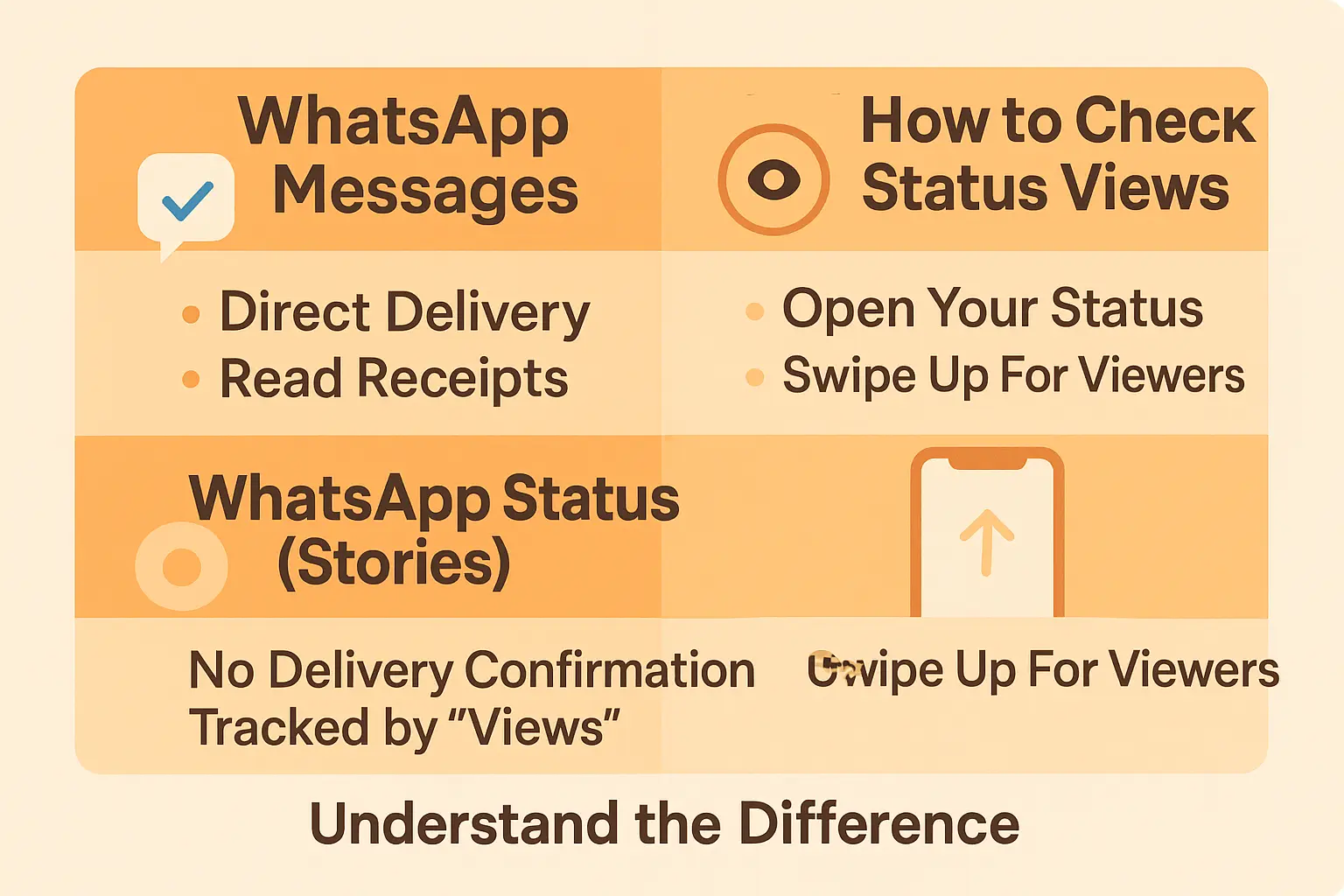
How Stories Actually Work
When you post a Status, it appears in contacts’ Status tab – if they’re in your audience and open WhatsApp within 24 hours. No notifications, no forced views. It’s 100% opt-in. Miss the window? Gone forever. 🕒
Control Your Audience
Choose who sees your Story:
- Everyone
- Exclude specific contacts
- Share only with selected people
Even if they’re on your list, they’ll miss it unless they check WhatsApp during the 24-hour window!
Tracking Views: The Eye Icon
Tap “My Status” > eye icon to see viewers – but only if:
- You have read receipts enabled
- The viewer didn’t disable their own receipts
No eye icon? Either nobody watched it… or privacy settings are hiding the crowd.
Pros And Cons
| Pros | Cons |
|---|---|
| ✅ Ephemeral – disappears after 24 hours | ❌ No guaranteed delivery alerts |
| ✅ Targeted sharing options | ❌ Privacy settings can hide views |
So, is the 24-hour timer genius or stressful? Either way, Stories are about capturing moments. Post that selfie – your contacts only get 24 hours to roll their eyes 😂
Message Ticks vs. Story Views: Not The Same Game
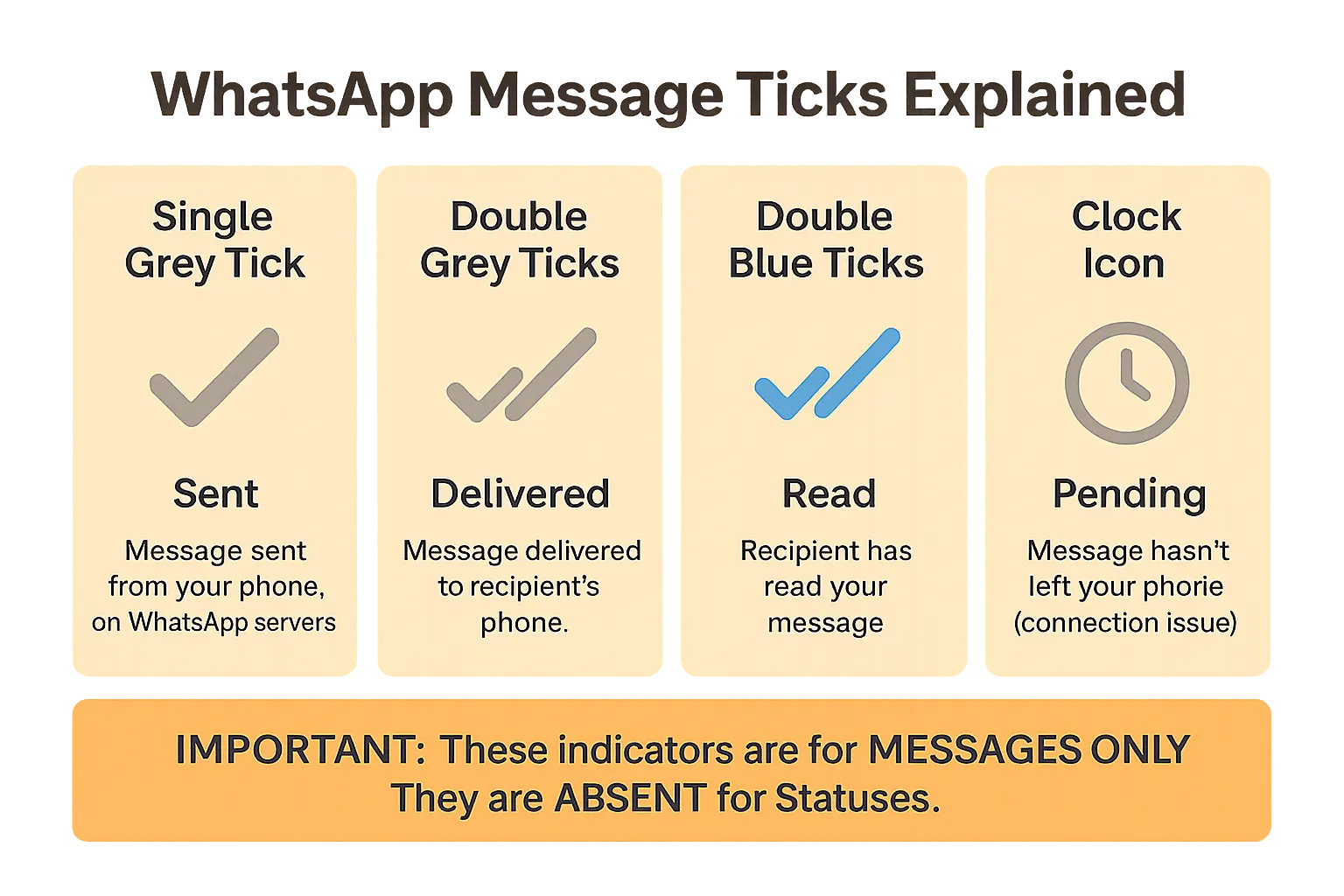
Let me break this down: those little checkmarks next to your WhatsApp messages? They’re not the same as story views. You’ve probably seen the gray ticks when sending messages, right? One tick means “sent,” two gray ticks mean “delivered,” and blue ticks mean “read.” Simple enough. But here’s the catch: this system doesn’t apply to WhatsApp Stories.
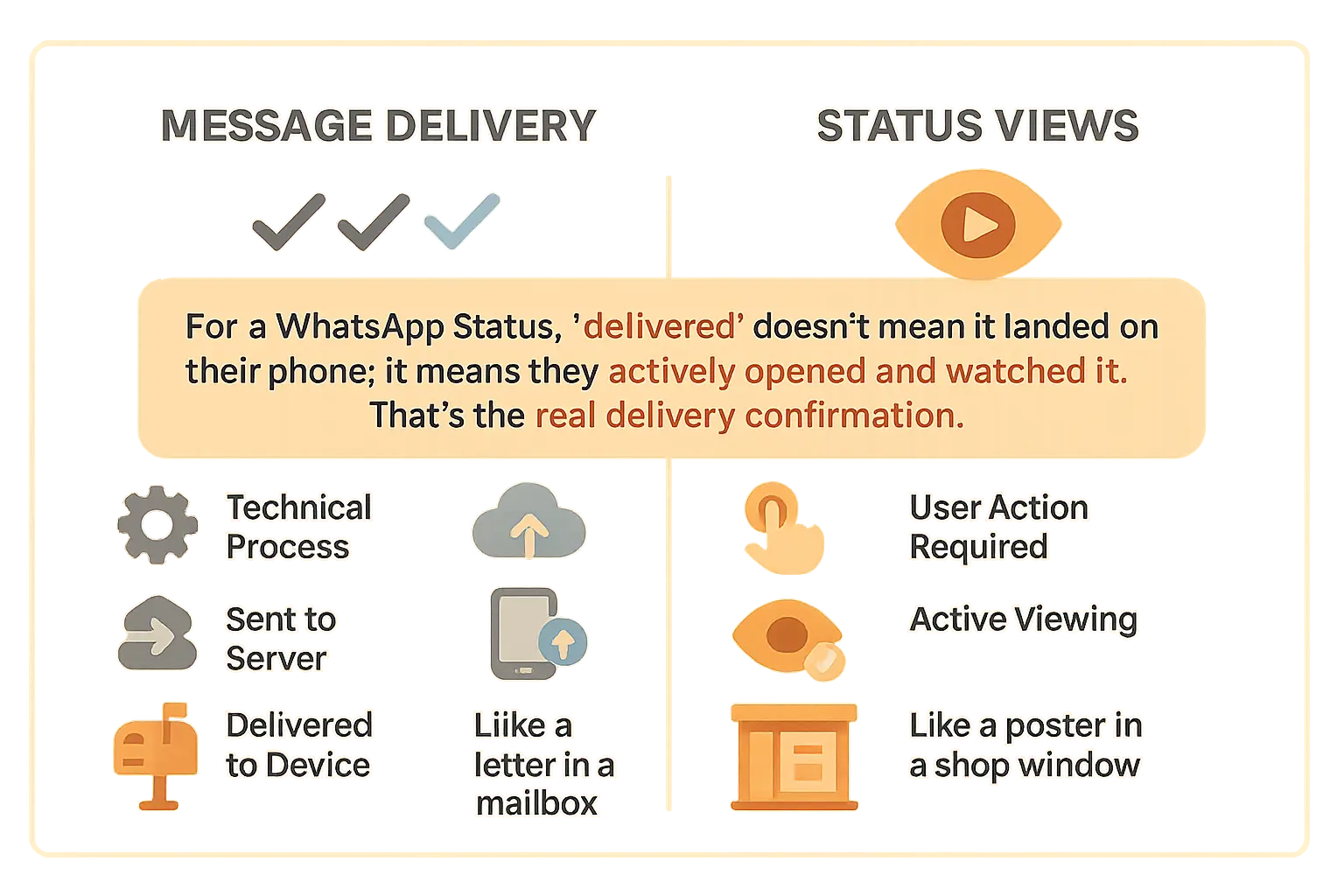
When you send a regular message, it’s like mailing a letter. The first tick says it left your hands. The second tick confirms it’s in the recipient’s mailbox. The blue ticks? That’s when they actually open the envelope. But WhatsApp Stories? Think of them as posters in a shop window. You won’t know someone saw it unless they physically stop and look.
“For a WhatsApp Status, ‘delivered’ doesn’t mean it landed on their phone; it means they actively opened and watched it. That’s the real delivery confirmation.”
Here’s why this matters: message delivery is a technical process, while story views depend on user action. Your story isn’t “delivered” until someone clicks to watch it. No peeking = no view count. This changes everything about how we measure engagement.
Want to confuse yourself further? Try this: message delivery status gets updated even if the recipient’s phone is off. But story views? If their phone dies, they’re ghosting your content. Two completely different systems under the same app roof. Who knew?
Still with me? Good. This distinction explains why you might see 0 story views but still have those blue ticks on messages. And no, your contacts aren’t intentionally avoiding your content (probably). They might just never have opened the “window” to see it. Privacy settings and user behavior completely change the game here.
A quick guide to WhatsApp message delivery ticks
Ever wondered what those tiny ticks really mean when you send a WhatsApp message? 😏 Let me decode this before we explore Stories. These icons aren’t just visual cues—they’re your window into message status. Spoiler alert: They work differently than you think!
Message status explained
Here’s the lowdown on those status indicators everyone checks religiously:
| Icon | Meaning | What it tells you |
|---|---|---|
| ✓ | Single Grey Tick | Your message left your device and hit WhatsApp’s servers. It’s on its way, promise! |
| ✓✓ | Double Grey Ticks | Successfully delivered to recipient’s phone but no proof they’ve peeked yet 👀 |
| ✓✓ | Double Blue Ticks | Bingo! The recipient opened the chat and saw your message. For voice notes, they saw it but might not have hit play yet. |
| 🕓 | Clock Icon | Message stuck in “sending” mode. Check your Wi-Fi/cellular connection or try again later. |
Group chats behavior
Double grey ticks only appear when every single member gets the message. Blue ticks pop up once everyone has checked it. Even if someone leaves the group later? The original delivery status stays forever. Imagine sending a group message—those ticks matter! 💬
Privacy settings impact
Only seeing one tick? Either you’re blocked 💥 or someone disabled read receipts. Want to stay stealthy? Turn off read receipts in Settings > Privacy. Heads up: This means you won’t see blue ticks for others’ messages either.
Technical details
Blue ticks appear only when someone actively opens your chat window. Even if they see your message in notifications or lock screen? No blue ticks yet 🙃 For voice messages, blue ticks mean they noticed your audio—but you’ll never know if they actually listened to it.
Pro tip: Want to read messages secretly? Enable airplane mode before opening WhatsApp, read everything, then force-close the app before reconnecting. WhatsApp won’t send any read receipts until you’re back online! ✈️
So, how does WhatsApp story “delivery” really work?
How to Check Who Viewed Your Story
Let’s get straight to the point! 🚀 On WhatsApp, a Story’s “delivery” isn’t about message confirmations—it’s all about tracking who actually watches your content. Here’s your quick guide:
- Open the Status tab.
- Tap My Status.
- Spot the eye icon with a number? That’s your total view count.
- Swipe up to reveal the full viewer list (with exact timestamps!).
No eye icon yet? Don’t panic! 🤔 Views update in real-time as people watch. But here’s the catch: this only works if both you and your contacts have read receipts enabled (we’ll cover that next!).
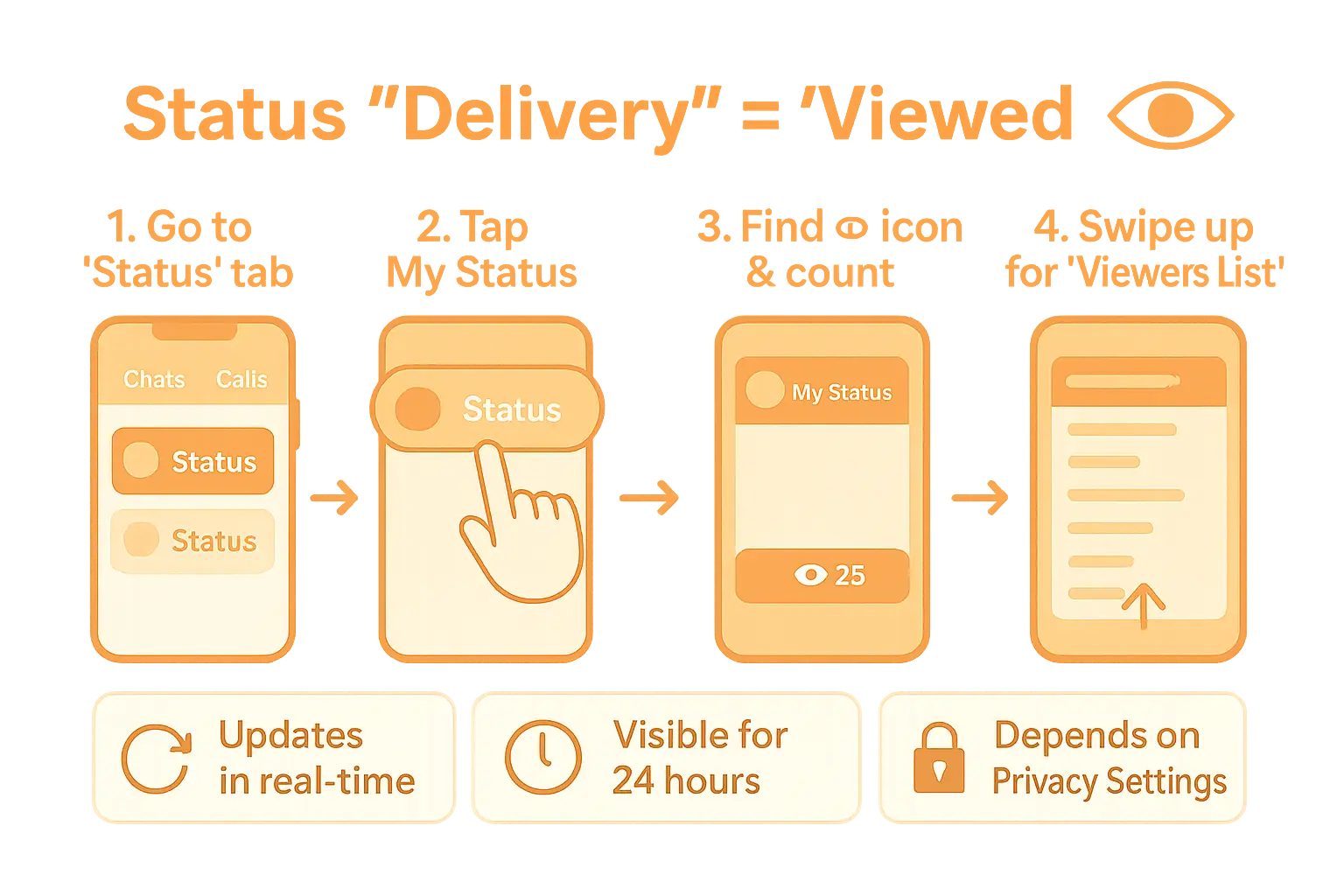
Pro tip: The viewer list includes exact timestamps—perfect for catching that friend who checks your Story at 2 AM. 😏
The 24-Hour Window: Timing is Everything
Stories last exactly 24 hours ⏳. During that time, the viewer list grows dynamically—you’ll see names appear instantly when someone watches. It’s like a live counter of your audience’s curiosity!
Big caveat: once the 24 hours expire, both the Story and its viewer data vanish. No traces left! Check early if you’re dying to know who peeked. Bonus: If you reshare a Story as a “Status highlight,” the viewer count resets for the new version. 🔄
Privacy Settings: The Invisible Gatekeeper
Missing the viewer list? Privacy settings might be the culprit! 🔒 Here’s why:
- No read receipts? If you or your contact disabled this (Settings > Privacy > Read Receipts), the viewer list disappears. Toggle it on to unlock details!
- Blocked by someone? Their views won’t show up—and you won’t see theirs either.
- Custom audience? Only people in your “Share with” list can view your Story. But here’s a loophole: if you mention someone in your Story, they’ll see it even if they’re not in your audience. Sneaky, right? 😏
Want control? Use “My contacts except…” or “Only share with…” to filter your audience. Names stay in the viewer list until the Story expires—even if you block them later. 🕵️♂️
Pro tip: If you delete a contact who already viewed your Story, their name stays on the list until the Story disappears. No hiding! 👀
Why You Might Not See Who Viewed Your Story
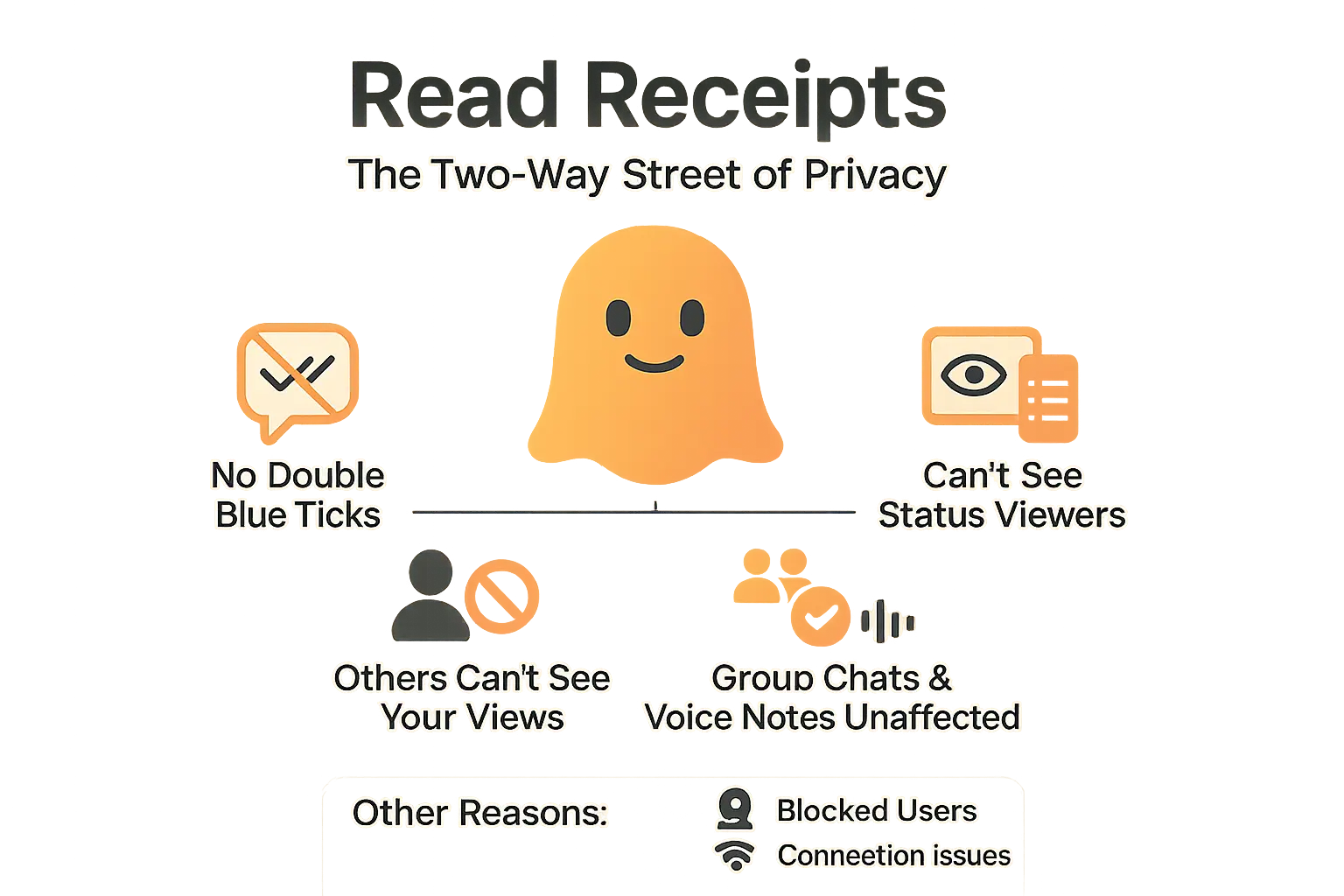
Here’s the thing: sometimes, everything seems to work, but you still can’t see who viewed your WhatsApp Status. The usual culprit? Read Receipts. Let’s break it down. 🕵️♂️
Read Receipts are those double blue ticks confirming someone read your message or viewed your story. You’ll find this setting under Settings > Privacy > Read Receipts (Android/iOS) or WhatsApp Web/Desktop > three dots > Settings > Privacy. Turn it off, and… voilà! You’re flying under the radar—but there’s a catch. 🌐
“Disabling your Read Receipts makes you a digital ghost. You can’t see who viewed your Status, and others can’t see that you’ve viewed theirs. It’s a two-way street.”
If you or your contact toggled this off, here’s what happens:
- No double blue ticks for messages.
- You won’t see who viewed your Status.
- Others can’t track your message reads or Status views.
- Group chats and voice messages still show receipts—no way around that.
Read Receipts aren’t the only reason. The person might’ve blocked you, or someone’s stuck with shaky Wi-Fi. WhatsApp’s privacy settings could also hide views if you limited your Status audience. Example: If you exclude a contact via “My Contacts Except…”, their view won’t show up.
Still confused? Check your Read Receipts settings or ask the viewer to confirm theirs. A reboot or app update often fixes glitches. Stories expire after 24 hours, so late views won’t update the counter. Yep, even WhatsApp has limits! 😉
WhatsApp’s design prioritizes privacy. Disabling Read Receipts hides your activity but cuts your visibility too. It’s like sending a letter without a return address. 📬
Still stuck? Share a test story with a friend to check if they saw it. If not, you’ve got a settings mismatch. Now you know where to dig! 🔍
Controlling your audience and the 24-hour rule
Let’s talk about how WhatsApp Stories actually work behind the scenes. 🤖 You’ve got full control over who sees your updates – whether it’s your entire contact list, a curated group, or even specific individuals. The beauty? It’s all customizable, and everything disappears like digital confetti after 24 hours! 🎉
- My contacts: The default setting – everyone in your phone book gets access.
- My contacts except…: Perfect for those times you want to exclude specific folks (like your nosy cousin 👀).
- Only share with…: Build a VIP list of contacts or groups – ideal for sharing baby photos with just the grandparents! 👶
Here’s the twist: your Story doesn’t magically appear on contacts’ phones. They have to open WhatsApp within that 24-hour window to see it. It’s like leaving a note on a digital doorstep – if they don’t check before midnight (technically 24 hours), it self-destructs! 💥
What about the tech side? Those little checkmarks? They’re part of WhatsApp’s clever feedback loop. When someone watches your Story, their device quietly confirms receipt – all while keeping your data private. Think of it as a secret handshake between devices! This system even works with WhatsApp’s end-to-end encryption, a topic developers geek out over on forums like Stack Overflow.
And that 24-hour timer? It’s not just a gimmick! WhatsApp automatically deletes Stories from their servers once the clock runs out. Bonus: you’ll see who viewed it (unless privacy settings block this). Even cooler? If someone leaves a group you shared with, they’re automatically removed from viewing future updates – no manual edits needed! 🚀
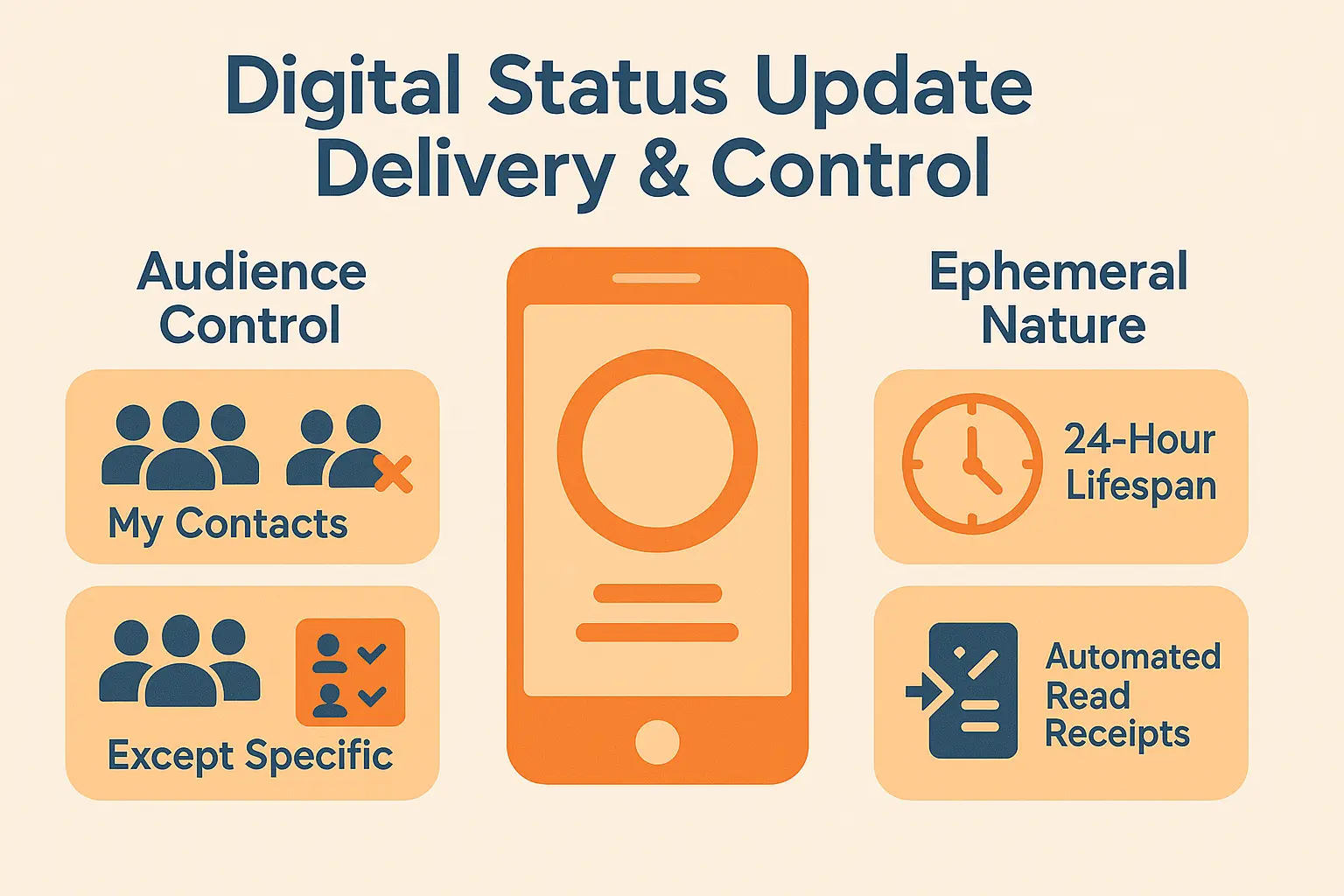
Story delivery: you’re in the driver’s seat
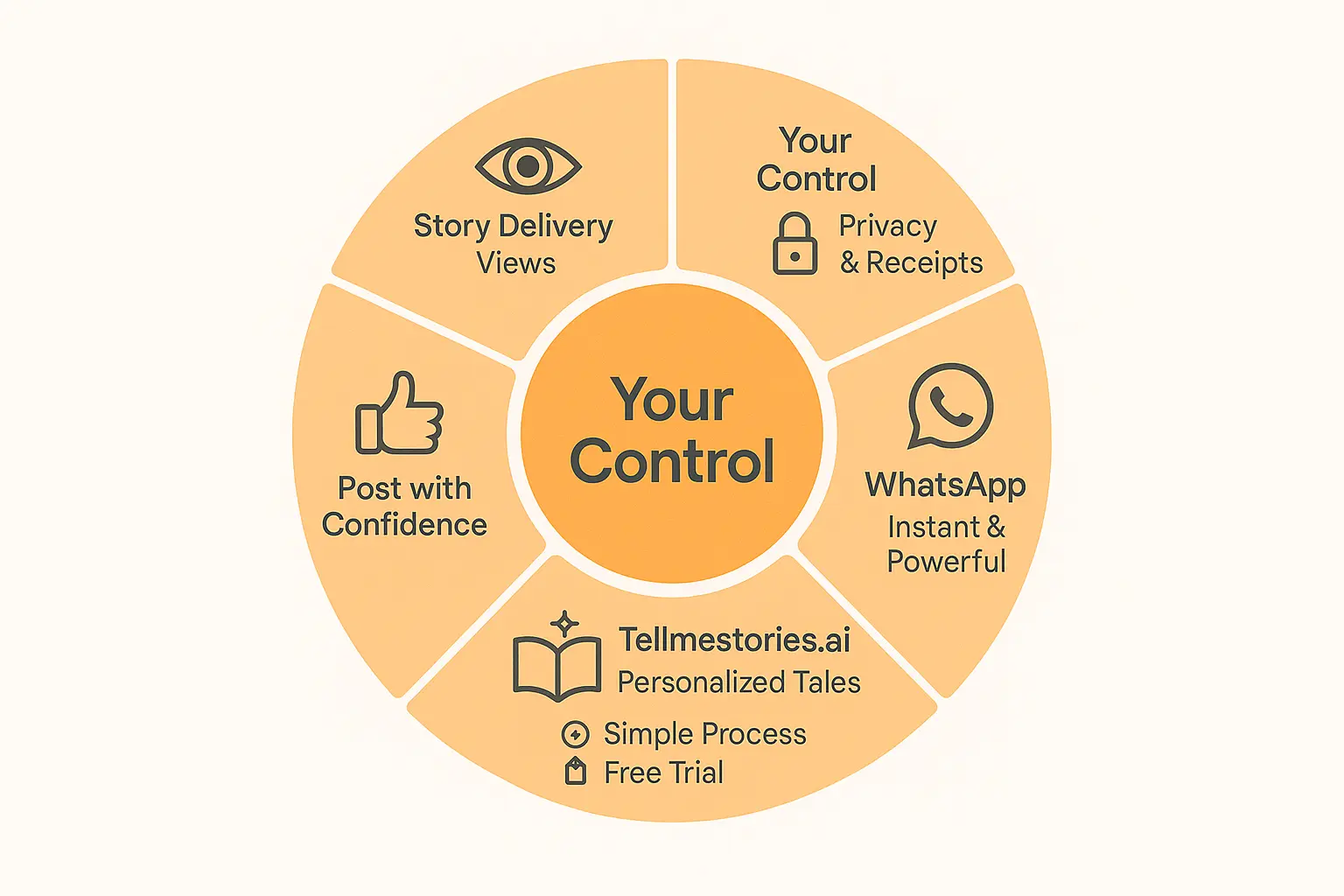
You control who sees your WhatsApp Stories. 🎯 Choose “My contacts,” share selectively, or exclude specific people – like managing a guest list for a party! WhatsApp lets mentioned contacts reshare your Story. 🎉
Stories vanish after 24 hours, but you’ll see who viewed yours. 👀 Tap the eye icon for viewer details – likes appear as green hearts. No guessing games here! You’ll also notice if someone revisits your Story – some moments deserve an encore.
Technical side? Gray ticks = delivered, blue ticks = viewed. 📲 If someone disables read receipts, you won’t see blue ticks – privacy first! WhatsApp automatically updates viewers if group members leave. Delivery status syncs across devices – no need to check your phone. Smart, right?
Want something unique? Try personalized children’s stories via WhatsApp! Send a voice note, and get tales starring your kid in minutes – no app downloads needed. Just use your regular chat! The AI remembers favorites for future tales – busy parents love creating bedtime stories on the go!
See how it works here, or start a free trial for instant custom stories. Yep, WhatsApp turns messages into bedtime adventures! 📚 Want printed books? Order directly – no extra steps!
Now you’ve mastered Story delivery, why not try something new? WhatsApp lets you share updates or magical tales – all while staying in control. 🚀 Ready to level up your chats?
WhatsApp story delivery is all about views, not ticks! Unlike messages, your story only “delivers” when someone actively watches it. Control who sees it, track views in real-time, and remember—privacy settings shape the whole experience. Ready to master WhatsApp’s magic? Dive deeper into how it works [here](https://tellmestories.ai/en/how-it-works/) or start your free trial [here](https://tellmestories.ai/en/free-trial/). You’ve got this! 🚀
FAQ
How do I know if my WhatsApp message was delivered?
Let me break it down! When you send a message, look at those tiny ticks. One grey tick = message sent ✅. Two grey ticks = delivered to their phone 📲. Two blue ticks = read, baby, read 📘. If you see a clock icon ⏰, your message is stuck due to bad internet or a dead battery. You can check exact delivery status by long-pressing any message > tap the “i” icon. Easy peasy! 📱
Is it possible to hide delivery receipts on WhatsApp?
Here’s the catch: You can disable read receipts entirely, but it works both ways! 🔒 Head to Settings > Privacy > Read receipts, and toggle it off. But watch out – this hides your own delivery ticks too! You won’t see who reads your messages, and others won’t see when you read theirs. 🤯 Oh, and this doesn’t work for group chats – those blue ticks stay visible for everyone!
Do two grey ticks mean my message is delivered?
You betcha! 🎯 Two grey ticks = message safely landed on their device. Think of it like a pizza delivery – the box is on their doorstep, but we don’t know if they’ve opened it yet! 🍕 If those ticks turn blue, that means someone peeked inside. 😏 Fun fact: In group chats, two ticks appear only when EVERYONE has received it. Talk about teamwork!
Why does one message deliver but another doesn’t?
Let me spill the tea ☕️. Delivery issues often mean either:👉 Their phone’s off or offline 📵👉 You’re blocked (but only if ticks never turn grey) 🛑👉 They’re living in internet dark ages with terrible Wi-Fi 🕳️👉 They have read receipts turned off (so you’re flying blind) 🕶️👉 WhatsApp’s having a mood swing (aka technical glitch) 🤖
What if a message is delivered but not read?
Picture this: Your message is chilling in their phone, but they’re ghosting it! 🎭 Two grey ticks mean it’s delivered, but they haven’t opened the chat. Could be they’re busy, distracted by TikTok, or just playing hard to get. 😏 The blue ticks only pop up when they actually open the conversation. It’s like sending a letter – delivered means it’s in their mailbox, but you don’t know when (or if) they’ll check it!
What does ‘sent but not delivered’ mean?
Oh no, your message is stuck in internet purgatory! ⏳ A single grey tick means it left your phone but hasn’t reached their device. Common culprits? 🔌 They’re offline, WhatsApp’s servers are taking a coffee break, or their phone’s at 0% battery. The clock icon appears when your message is still waiting to send. Don’t panic – try reconnecting to Wi-Fi or wait for better signal. 📶
How can I disable delivery ticks?
Quick fix time! 🛠️ Go to Settings > Privacy > Read receipts, and switch it off. But remember – this makes you a digital ninja 🥷: 👉 No one sees your blue ticks👉 You can’t see who reads your messages👉 Group chat read receipts still show up👉 Voice note plays still track as “played”
If it shows delivered, does that mean I’m not blocked?
Double grey ticks usually mean you’re safe from blockage! 🎉 If someone blocked you, your message would stay at one tick forever. But plot twist: They could’ve blocked you AFTER your message delivered. Like a sneaky ninja! 🕵️ If they block you, future messages will get stuck at one tick. Also check if they’ve deleted their account – that makes delivery impossible too!
Can I hide delivery ticks on WhatsApp?
Technically… not exactly! 🤫 The only way is turning off read receipts (Settings > Privacy > Read receipts). But fair warning – this makes you a WhatsApp ghost! 👻 You lose:👉 Blue ticks for messages👉 Story view tracking👉 Read receipts from othersBUT – you can still see delivery status (two grey ticks) unless they block you. It’s a privacy trade-off! 🔄