
The key takeaway: Cutting screen time boosts focus, sleep quality, and slashes anxiety by 50% in heavy users (4+ hours/day). Prioritize screen-free rituals—like meals or bedtime—to free up 1.5+ hours daily. Simple fixes like grayscale mode (saves 40 mins/day) or tech-free zones help build sustainable habits. Backed by Stanford research, these steps protect brain health and family connections.
Struggling to reduce screen time? Endless scrolling silently steals focus, sleep, and brainpower 🧠 (studies link it to cognitive decline and brain matter loss). Did you know overuse causes “tech neck,” disrupts melatonin 🌙, or shrinks brain tissue? This article breaks down why cutting screen time matters, how to track habits, and offers science-backed fixes—from ADHD-friendly hacks—to help you regain control. Spoiler: Disabling notifications ⚠️, screen-free zones 🚫📱, or swapping doom-scrolling for walks reclaim hours for creativity, rest, and moments you’ll cherish ✨. Ready to outsmart screens? Let’s dive in.
Why you should seriously consider reducing your screen time
The hidden toll on your physical health
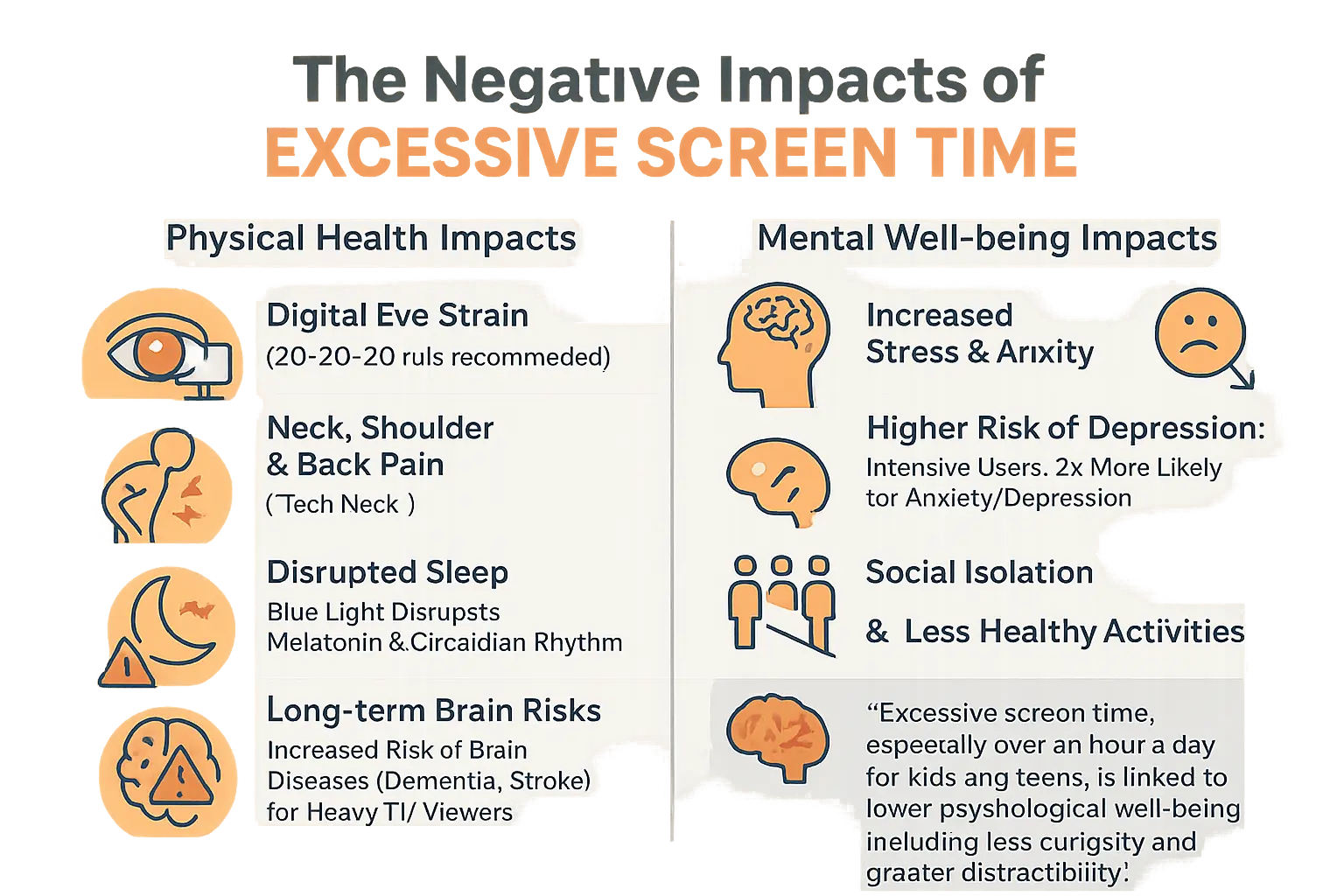
Excessive screen time doesn’t just strain your eyes – it impacts your entire body. Prolonged screen use causes digital eye strain, with symptoms like blurred vision, dry eyes, and headaches. The 20-20-20 rule offers a simple fix: every 20 minutes, look at something 20 feet away for 20 seconds. This small habit **prevents cumulative eye damage and maintains visual comfort**.
Slouching over devices creates tech neck – a modern epidemic of neck and shoulder pain. A Stanford study found adults spending over 7 hours daily on screens face higher risks of posture-related issues. When your head tilts forward 60 degrees, its effective weight triples, creating extreme neck strain. Long-term effects include increased chances of brain-related diseases like dementia and stroke, with research linking excessive screen time to cognitive decline and reduced gray matter volume.
Your sleep suffers too. Blue light from screens disrupts melatonin production, making it harder to fall asleep. This sleep disruption creates a domino effect on your overall health – from reduced cognitive function to weakened immunity. Experts recommend avoiding screens at least 1 hour before bed to allow natural melatonin production and improve sleep quality.
Protecting your mental well-being
Screen overload isn’t just physical. Heavy users face double the risk of anxiety or depression diagnoses. Constant digital stimulation rewires brain structures – Stanford research shows thinner cortex and reduced gray matter in frequent users. These brain regions control emotional regulation and decision-making, explaining why heavy users often struggle with impulse control and emotional balance.
“Excessive screen time, especially over an hour a day for kids and teens, is linked to lower psychological well-being, including less curiosity and greater distractibility.”
Social connections suffer too. Screen time often replaces meaningful interactions, fueling loneliness. A ScienceDirect study confirms this connection between heavy screen use and social withdrawal. Virtual interactions lack the emotional depth of face-to-face communication, weakening social bonds. The brain’s attention systems adapt to constant stimulation, making real-world focus harder.
Even your brain’s architecture changes. Excessive screen exposure correlates with reduced gray matter – crucial for information processing and emotional regulation. This mental fatigue makes daily tasks feel more challenging, creating a cycle of stress and screen dependency. Multitasking across apps fragments attention, with studies showing it takes an average of 23 minutes to regain focus after interruptions – a phenomenon called “attention residue.”
Physical health risks multiply too. Sedentary screen time increases diabetes, cardiovascular disease, and obesity risks. The same Stanford research highlights how prolonged sitting combined with screen use reduces calorie expenditure and disrupts metabolic functions. This double burden strains both body and mind, creating systemic health challenges that compound over time.
Your first step: track your screen time and set clear goals
Becoming aware of your digital habits
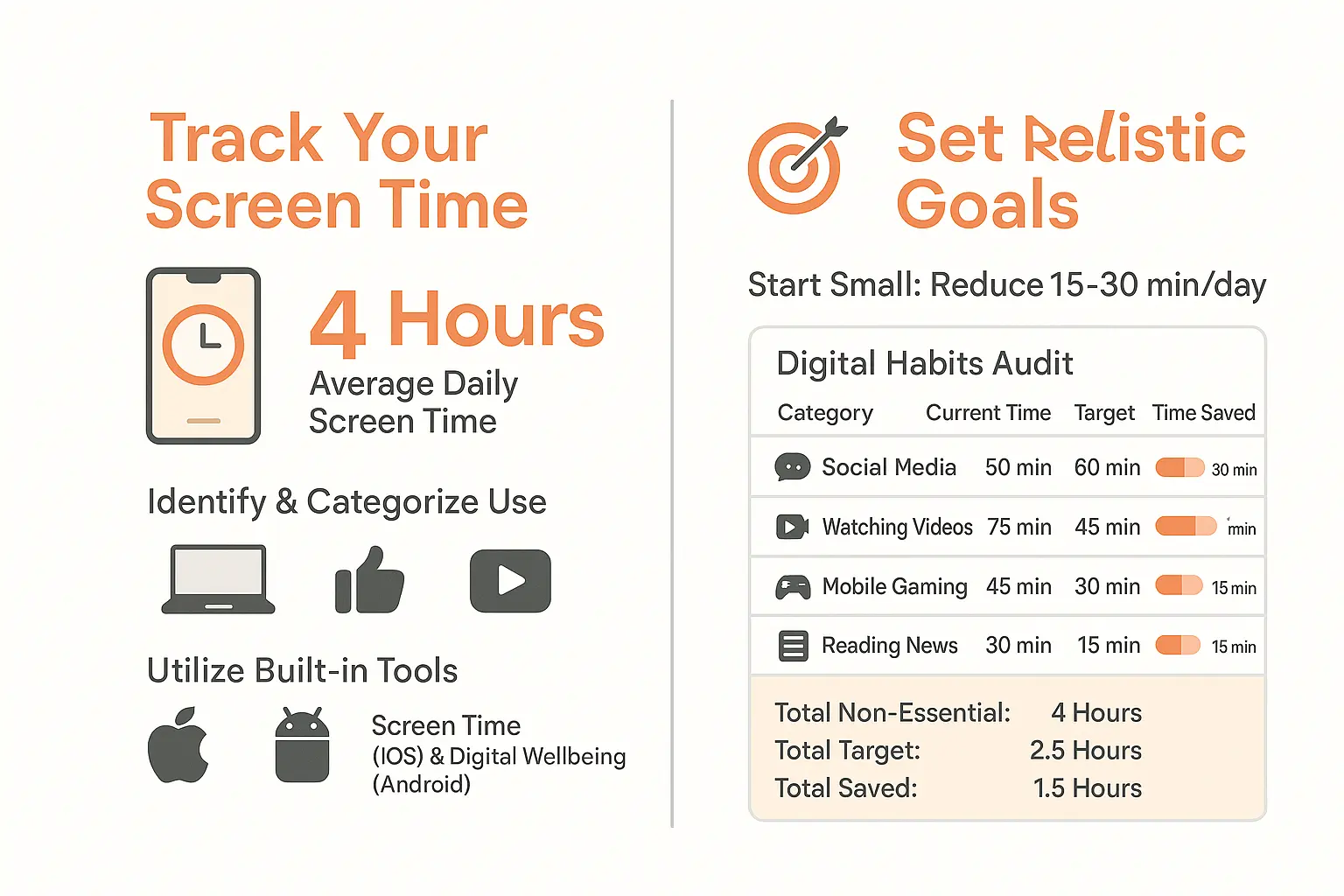
Do you really know how much time you spend on your phone? 🤔 The average person spends nearly four hours daily on screens, with 90% of that time classified as non-essential. Start by checking built-in tools like iOS Screen Time or Android Digital Wellbeing—they break down app usage and screen hours in easy-to-read reports. For example, Screen Time shows weekly summaries and app-specific stats, while Digital Wellbeing uses progress bars to highlight overused apps. Categorize activities: work (video calls, emails) vs. mindless scrolling (social media, short-form videos). This audit reveals where to cut back—like social media or video binging—and sets the stage for change.
Setting realistic goals for a digital detox
Small steps matter. Don’t aim for zero screen time—target gradual reduction. Try cutting 15-30 minutes daily, then build from there. Use this sample audit to visualize shifts:
| Activity Category | Current Daily Time | Target Daily Time | Potential Time Saved |
|---|---|---|---|
| Social Media Scrolling | 90 min | 60 min | 30 min |
| Watching Videos (non-work) | 75 min | 45 min | 30 min |
| Mobile Gaming | 45 min | 30 min | 15 min |
| Reading News Feeds | 30 min | 15 min | 15 min |
| Total Non-Essential: 4 hours | Total Target: 2.5 hours | Total Saved: 1.5 hours |
Focus on high-impact areas first. For parents, tracking screen time isn’t just personal—it’s a family effort. Did you know 3 out of 4 toddlers already watch TV? Start by limiting your own usage to model healthy habits. Try designating screen-free zones at home, like during meals or in bedrooms, to reinforce boundaries. Remember, even 1.5 extra hours daily can transform family time or creativity. Imagine using that saved time for a walk, a board game, or simply connecting face-to-face. Ready to reclaim your day? 🚀
Practical strategies to unplug and reconnect
Tweak your tech to work for you, not against you
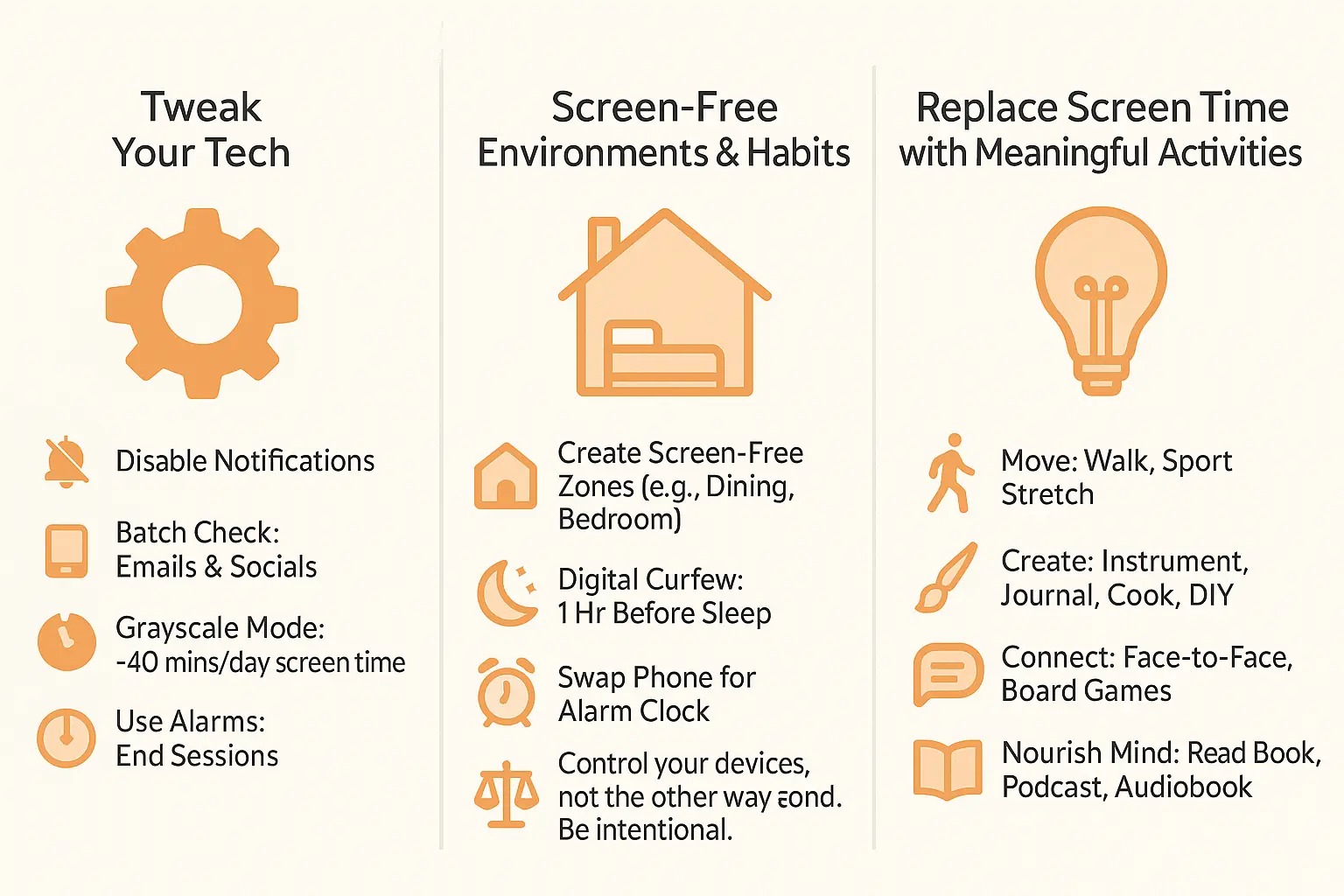
Smartphone notifications act like constant interruptions – studies show disabling non-essential alerts reduces impulsive screen checks by 63%. These tech hacks create intentional digital boundaries:
- Switch to grayscale mode: A Stanford study found this simple change can cut recreational screen time by 40 minutes daily. The lack of color disrupts dopamine-driven scrolling by removing visual rewards from social media and games
- Batch social media: Check apps only at 9am, 1pm, and 6pm. This “time boxing” method protects mental energy for creative work and face-to-face interactions
- Set 15-minute timers for entertainment apps. Visual countdowns create awareness about time spent and make you consciously choose whether to continue
Activate “Do Not Disturb” mode during family time. For parents: WhatsApp-based storytelling transforms screen time into quality time by creating personalized adventures without app downloads. This approach reduces device dependency while nurturing imagination through interactive narratives.
Create screen-free environments and habits
The goal isn’t to eliminate technology, but to create a healthy balance where you control your devices, not the other way around. It’s about being intentional.
Try these environmental changes:
- Make dining tables and bedrooms tech-free zones. Charge devices in a central location to prevent midnight scrolling and morning phone grabs
- Implement a 1-hour digital curfew before bedtime. This allows melatonin production to regulate naturally, improving sleep quality by 20% according to the National Sleep Foundation
- Use traditional alarm clocks to resist midnight scrolling. Physical devices create tactile experiences that build healthier morning routines
Designate “screen-free Sundays” for family activities. Store devices in a basket during game nights to encourage real interactions. For children: Replace cartoon time with personalized audio stories that adapt to their preferences while maintaining healthy tech boundaries.
Replace screen time with meaningful activities
Empty time creates vacuum – fill it with these alternatives:
- Get moving: Physical activity releases endorphins that naturally reduce cravings for digital stimulation. Try 10-minute dance breaks or family stretching sessions
- Unleash your creativity: Creative pursuits activate different brain regions than screens. Try journaling with physical books instead of e-readers – studies show 30% better memory retention
- Connect with people: Face-to-face interactions produce oxytocin, a natural counterbalance to digital dopamine hits. Organize weekly board game nights or neighbor coffee meetups
- Nourish your mind: Physical books improve memory retention by engaging tactile senses. Try audiobook listening clubs or podcast discussion groups
For families: Use personalized storytelling instead of cartoons at bedtime. This creates bonding moments while developing language skills. Pair screen-free periods with the 20-20-20 rule: Every 20 minutes, look at something 20 feet away for 20 seconds to reduce eye strain from unavoidable screen use.
The screen time struggle: special tips for ADHD brains
Why it’s harder, and why it’s not your fault
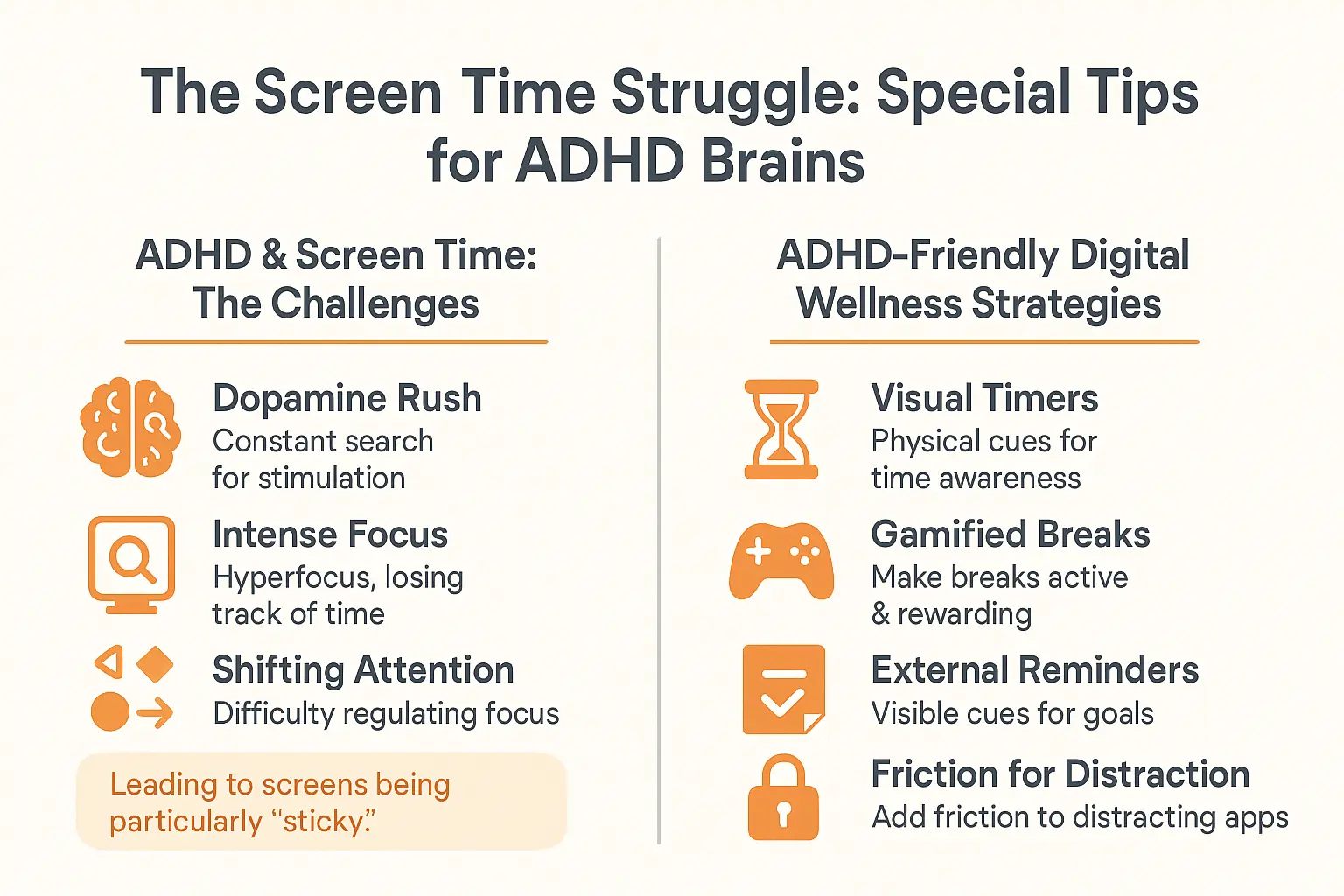
For ADHD brains, screen time management isn’t just about willpower. It’s about how our brains are wired. Dopamine-seeking behavior and hyperfocus tendencies make digital distractions uniquely sticky. When you have ADHD, screens often become hyperfocus magnets – those intense focus periods where time disappears. This isn’t laziness or lack of discipline.
The dopamine system in ADHD brains craves immediate rewards. Screens deliver exactly that through instant gratification loops. When hyperfocus kicks in, your brain’s timekeeping mechanisms go dark. You might start browsing for “5 minutes” and suddenly realize hours vanished. This isn’t personal failure – it’s neurodivergent brain wiring doing what it naturally does.
ADHD-friendly strategies for digital wellness
Managing screen time with ADHD needs tailored approaches. These strategies work with your brain’s unique processing style:
- Use visual timers: Physical timers create concrete time boundaries. The ticking sound and visible countdown make abstract time feel tangible, helping transition between activities.
- Gamify your breaks: Turn screen breaks into quest mode. For every 25 minutes of work, unlock 5 minutes of active movement – think jumping jacks or kitchen dance parties.
- Externalize your reminders: Post-it notes on screens or desks act as external executive functioning support. Place visual cues where your eyes naturally go.
- Make it harder to start: Log out of distracting apps after each use. Hide social media in a “buried folder” on your phone’s last home screen.
These approaches work because they create friction points that respect ADHD brain patterns. By making screen access require deliberate action, you build natural pause moments. Visual timers combat time-blindness, while gamification turns breaks into dopamine-positive experiences. External reminders compensate for executive functioning challenges.
Creating a screen-balanced home for your family
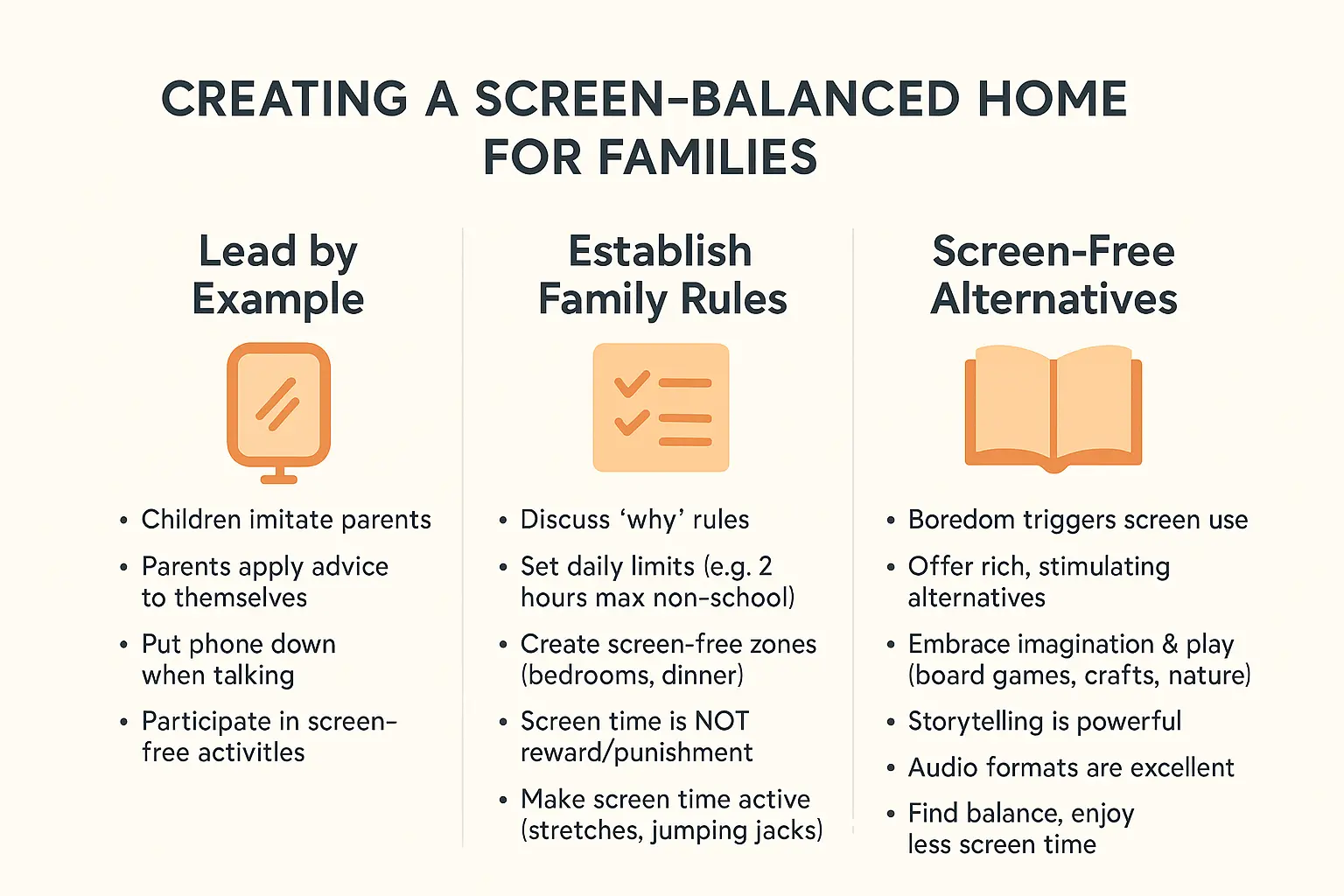
Lead by example: be the model you want to see
Children mirror their parents’ habits. If you’re glued to your phone, they’ll follow suit 📵. Set boundaries: put devices away during meals, switch off notifications during playtime, and prioritize face-to-face interactions. Small changes—like reading physical books or tech-free walks—teach kids that fun thrives beyond screens. Try board games or scavenger hunts to show them joy doesn’t need Wi-Fi. Consistency is key: When kids see you prioritize screen-free time, they’ll adopt it naturally. For instance, swapping your evening scroll for a family storytelling session using voice-activated stories via WhatsApp proves tech can enhance—without replacing—real-life connections.
Establish clear and consistent family rules
- Set daily limits: Agree on 2 hours max for non-school screen time. Use built-in device timers or apps like Screen Time to visualize boundaries.
- Create screen-free zones and times: No devices at meals or 1 hour before bedtime. Extend this to homework spaces to minimize distractions.
- Screen time isn’t a reward or punishment: Avoid making it a power struggle. Focus on teaching self-regulation instead of control.
- Make screen time active: Stretch or do jumping jacks during breaks. Turn passive viewing into a movement break—it keeps energy levels balanced.
Involve everyone in rule-making. Explain why limits matter, and use charts or timers—turn tracking into a game! For example, let kids earn extra outdoor playtime by hitting weekly screen-free milestones. Tools like Tellmestories’ WhatsApp voice-to-story feature spark creativity without apps, replacing passive screen time with interactive stories 📖. This approach turns storytelling into a collaborative ritual, not a tech-dependent habit.
Discover the magic of screen-free alternatives
Screen-free moments fuel creativity! 🎨 Try:
- Read bedtime stories where your child becomes the hero (explore audio formats for engaging options). Let their imagination guide plot twists—this builds confidence and narrative skills.
- Build forts or plant gardens to spark nature curiosity. Even a small herb garden on a windowsill teaches responsibility and wonder.
- Host “mystery box” crafts with household items. Turn boredom into innovation—kids might create a new board game or a cardboard robot.
Busy parents: Practical solutions like voice-activated storytelling via WhatsApp create personalized tales in seconds. Pair this with screen-free bonding to nurture imagination. Less screen time means better sleep, stronger family ties, and creativity that outshines any device 🌟. Start tonight: Swap one screen-heavy routine for a story where your child saves the day—no login required. The result? A win for family connection, and a step toward balanced tech habits that last a lifetime.
Reducing screen time isn’t about ditching tech—it’s about reclaiming focus, health, and connections. Start small: track habits, set limits, swap scrolls for strolls or stories. Your brain (and family dinners) will thank you. Ready to unplug? Explore [screen-free activities](https://tellmestories.ai/wellness/screen-free/) or (https://tellmestories.ai/fr/formats/audio/) that spark imagination—no screen needed. 🌟 Your choices today shape a calmer tomorrow.
FAQ
How can I drastically cut down on screen time?
Time to start with small, actionable steps! Begin by tracking your usage with built-in tools like Screen Time (iOS) or Digital Wellbeing (Android). Categorize your habits—social media, streaming, gaming—and identify non-essential areas. Set achievable goals, like trimming 15-30 minutes daily. Pro tip: Use the “batching” technique to check apps only 2-3x a day. And remember, replacing screen time with activities like walks or journaling works wonders 🚶♀️📘
What’s the 3 6 9 12 rule for screen time?
Great question! While the 3 6 9 12 rule isn’t widely recognized, experts often reference the 20-20-20 rule for eye health: every 20 minutes, look at something 20 feet away for 20 seconds. For daily limits, aim for under 2 hours of non-work screen time. Think of it as a “digital detox” plan tailored to your lifestyle!
How do I reduce iPhone screen time effectively?
You can hack your iPhone’s features! Use Screen Time to set app limits (e.g., 30 mins/day for social media). Enable grayscale mode—it makes scrolling less appealing (science says it cuts usage by 40 mins/day!). Disable non-essential notifications and hide distracting apps in a “deep folder” on your home screen. Bonus: Try a “do-not-disturb” schedule during meals or an hour before bed 📵
What’s considered healthy screen time for adults?
The sweet spot? Under 2 hours daily for non-work activities. The average adult clocks 7+ hours, but experts warn excess screen time links to insomnia, eye strain, and even mood issues. Prioritize quality over quantity—swap doomscrolling for audiobooks or podcasts. And yes, your weekend binge-watching marathon doesn’t count as “relaxation” 😅
Got ADHD? How to manage screen time better
ADHD brains crave dopamine hits from screens—no judgment! Try these ADHD-friendly hacks: – Use a physical timer to visualize breaks (hello, Pomodoro!). – Gamify screen-free time: 5 mins of dancing for every 25 mins of work. – Place sticky notes on your laptop reminding you to pause. – Log out of apps after use—it adds friction for impulsive scrolling. You’ve got this! 🎯
What’s healthy screen time for teens?
Teens average 9 hours/day—yikes! The American Academy of Pediatrics suggests under 2 hours for non-educational use. Set family rules: no devices during meals, 1-hour streaming blocks, and screen-free bedrooms. Replace TikTok scrolls with board games or outdoor adventures. Pro tip: Lead by example—parents, put your phones down too! 📚
When does screen time become excessive?
Excessive = 7+ hours daily. That’s the average for 40% of adults, linked to insomnia, neck pain, and even brain fog. If you’re doomscrolling past midnight or skipping workouts for Netflix, it’s time to reassess. Prioritize activities that boost your energy (yoga, anyone?) over passive scrolling 🧘♂️
What’s the 10 10 10 screen time rule?
You might be mixing it up! The 20-20-20 rule is the gold standard: every 20 mins, focus on something 20 feet away for 20 seconds. For daily habits, chunk screen time into 50-minute blocks with 10-minute breaks. This keeps your eyes and mind fresh—ideal for productivity! 🕒
How many hours before bed should I ditch screens?
Time to power down 1 hour before bedtime! Blue light messes with melatonin, your sleep hormone. Swap TikTok for a physical book or a calming podcast. Bonus: Charge your phone in another room—it’s a game-changer for resisting midnight scrolls 🌙