
The essential takeaway: Service discovery automates app connections in dynamic tech ecosystems 🚀. No manual IP tracking—services self-register instantly. This powers scalable, resilient cloud systems with seamless updates. Kubernetes uses smart DNS: devs access stable names while IPs shift automatically. Built for modern infrastructures where reliability meets agility! 💡
Frustrated with manual service setups that break when IPs change? 🤯 Discover service automates how apps find each other in dynamic cloud environments. Think of it as a living phonebook: when microservices move (and they will!), it instantly updates their “addresses” to keep everything connected. It powers scalable apps by routing traffic to healthy instances (no more 3AM panic calls! 😉) and leans on tools like Kubernetes or Consul. We’ll explain how smart registries track health in real-time, making failures fade into the background while your digital world runs smoother than ever. 🚀
What on earth is service discovery? a simple guide
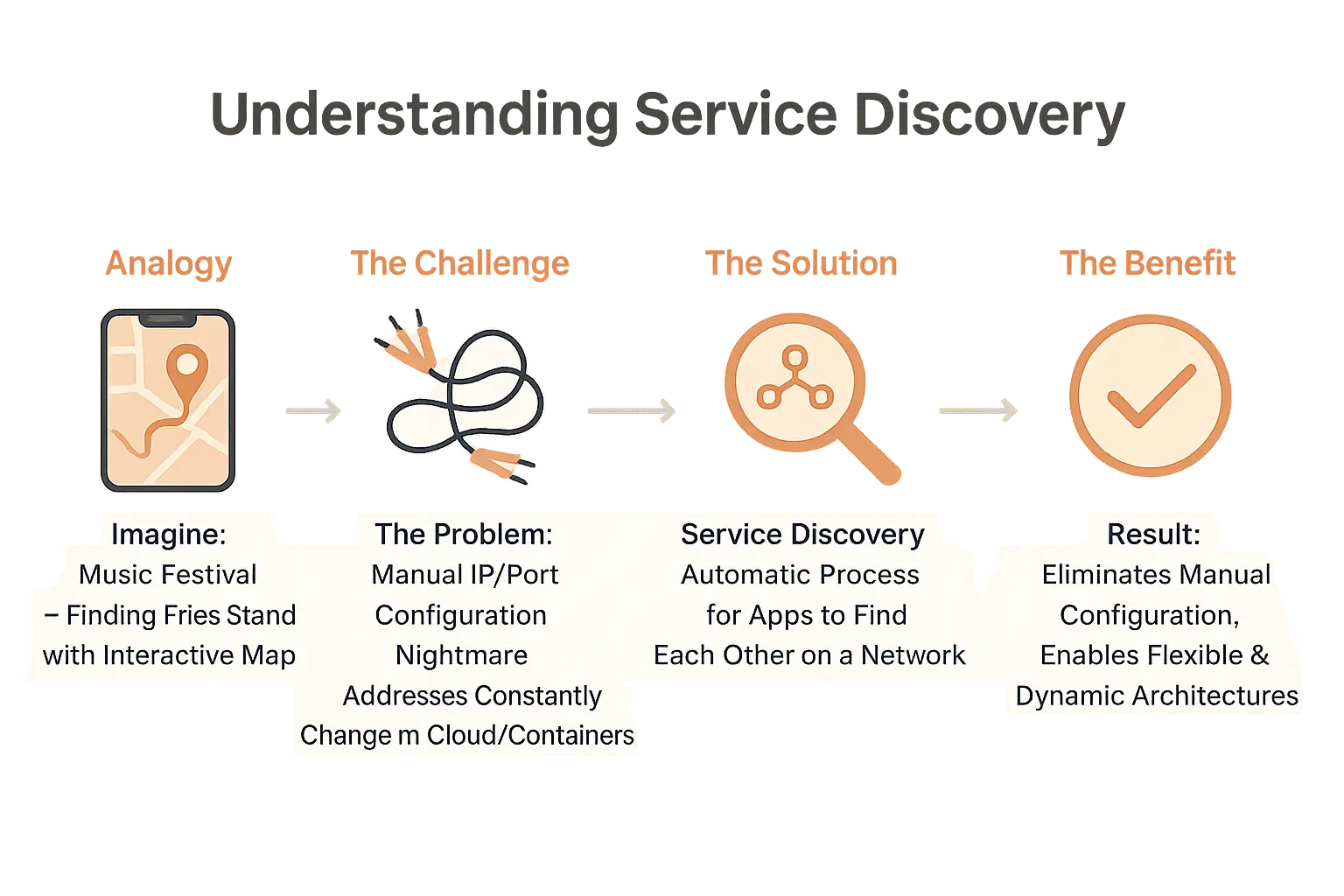
Let’s start with a simple image
Ever tried finding a friend in a packed concert without their phone number? 😅 Now imagine they shared their location live via WhatsApp. That’s service discovery for networks! Instead of memorizing changing IP addresses, systems automatically find the right service “location” in real-time. Think of it like Bluetooth pairing – your phone just knows which devices are nearby without you typing their MAC addresses. 🚀
So, what does it mean for technology?
Think of microservices like food trucks at a festival – they move, scale up during lunch rush, or break down. Service discovery acts as the festival app showing you where each “truck” (service) is parked right now. No more static maps or manual updates. Instead:
- Dynamic tracking: Services self-register when they start
- Real-time updates: Outdated entries vanish automatically
- Smart routing: Directs traffic to healthy instances
Behind the scenes, protocols like DNS-SD (DNS Service Discovery) act as the festival’s Wi-Fi network – instantly listing available food trucks when you connect. Even better? It works for cloud apps scaling from 1 to 1,000 servers without a single config file change. 🌐 Add mDNS (multicast DNS) into the mix, and services become like smart speakers that “hear” each other on your home network – no manual IP typing needed!
Without this, scaling cloud apps would be like organizing that festival without any signage – chaos! 🚨 Imagine 100 food trucks moving every hour and attendees wandering lost. Now picture Kubernetes clusters auto-starting new service “trucks” during traffic surges while the discovery system reroutes customers. That’s the magic of automation over manual setups! The system even remembers which trucks passed their health checks – no one wants a flat tire surprise. 🚐
Why service discovery is a game-changer for modern apps
Managing complex apps without service discovery feels like herding cats in a storm 🌪️. When microservices took off, chaos followed. Developers went from monoliths (one big app) to 1001 tiny services – all needing to talk to each other. Without service discovery, it’s like telling 1001 people to find each other in a maze with moving walls. Today, service discovery acts as a smart GPS for apps – tracking where services live and how they talk. Let’s see why this matters.
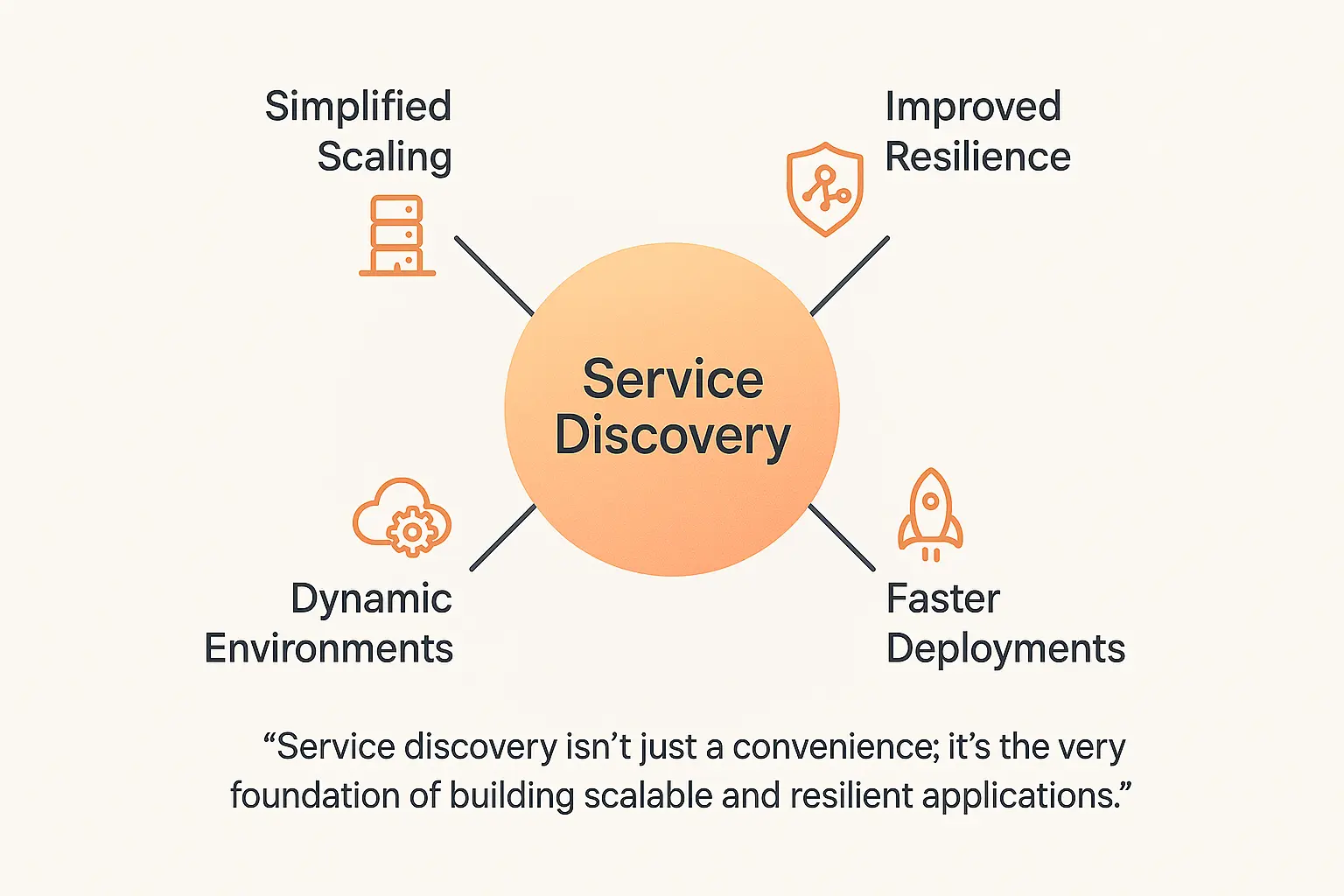
- Simplified scaling: Add service instances like adding highway lanes during rush hour 🚗. Example: During a flash sale, your payment gateway scales from 10 to 50 instances in seconds. No config chaos, no frantic Slack pings – just smooth sailing.
- Bulletproof resilience: When a service fails, traffic reroutes instantly. Like your GPS finding a new route – users never notice the detour 🧭. If one database node crashes, requests go to a healthy one automatically.
- Cloud-native magic: Built for fast-changing environments 🌩️. Protocols like DNS-SD (used in Kubernetes) and mDNS (Apple’s AirPrint) keep everything connected, whether you’re on AWS, Azure, or a hybrid setup.
- CI/CD supercharger: Services self-register like a living phonebook 📱. Deploying updates feels smooth – no more “Wait, did we update the config?” drama. Imagine pushing code and watching services auto-heal and rebalance.
In today’s dynamic IT environments, manually tracking services is impossible. Service discovery isn’t just a convenience; it’s the very foundation of building scalable and resilient applications
Handling the chaos of microservices
Before service discovery, config updates felt like herding cats 🐱. Need to move a database? Update 50 config files manually. Now, tools like Kubernetes or Consul handle it. New services shout “I’m here!” to the registry. Failed ones vanish quietly – like ninjas in the night. No more 3 AM callouts because “service X thinks service Y is dead.” 🚨
Building for failure (and success!)
Health checks are the silent heroes. They test services every few seconds – if a service fails, it’s yanked from the pool 💪. Kubernetes uses liveness/readiness probes: /health checks if it’s alive, /ready confirms it’s prepped for traffic. Result? Traffic never hits broken parts. Users? They’re sipping coffee, not filing bug reports 🛠️.
 Service discovery benefits” />
How Does It Actually Work? Behind The Scenes
Ever wondered how your smart devices automatically find each other on a network? Let me break it down! Service discovery works like a hotel concierge 🏨 – it’s all about connecting services without manual effort. Think of how Tellmestories crafts bedtime tales via WhatsApp: you send a voice note, and our system magically finds the right AI to create the story. No need to know which server handles your request – it just works. Curious how?
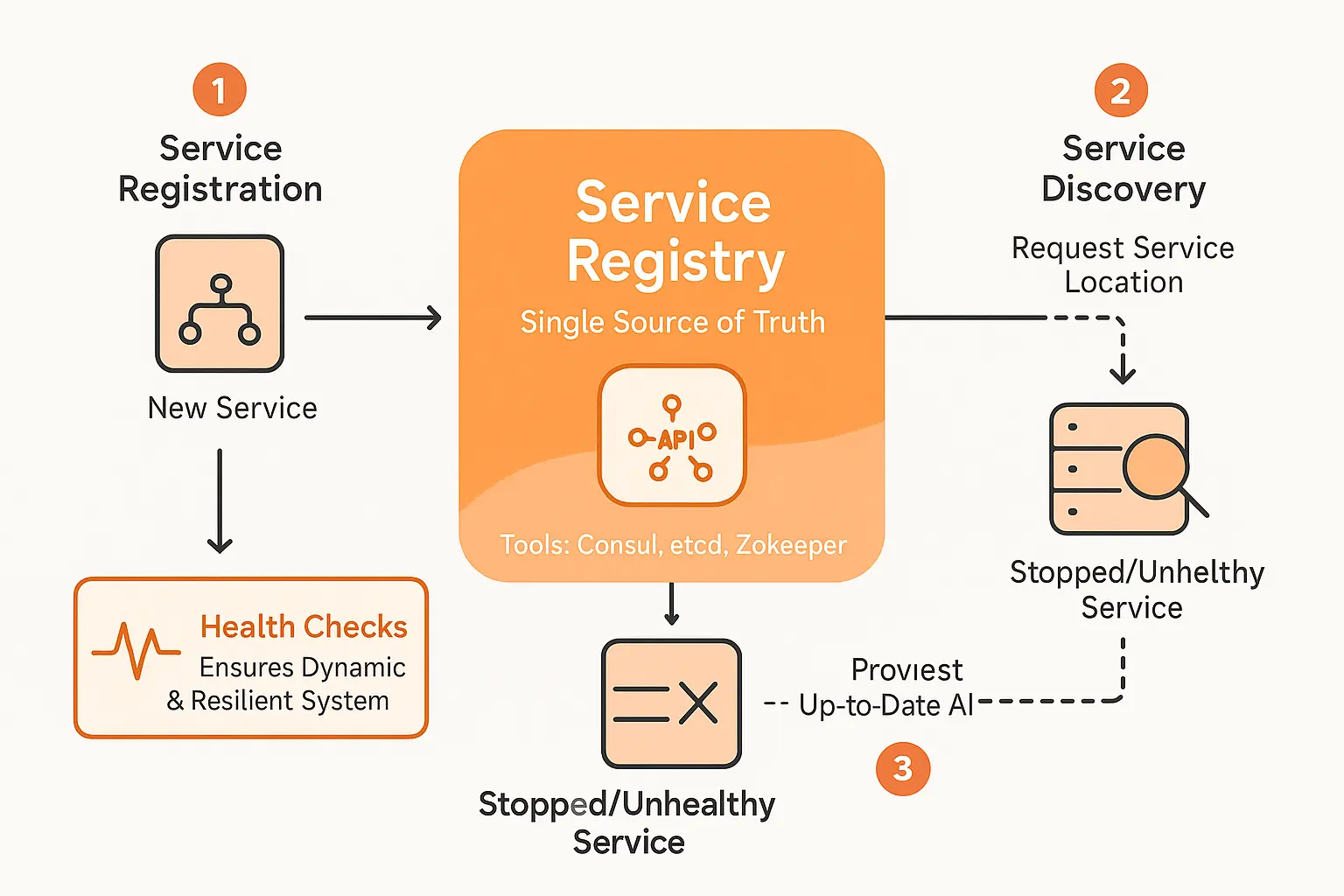
Here’s the 3-step magic:
- Service Registration: New services shout “I’m ready!” to the registry, sharing their “address” (IP + port). Like a new chef announcing they’re at the kitchen station 🍳
- Service Discovery: When services need to talk, they ask the registry “Where’s the [service]?” – just like asking the concierge for room numbers
- Service Deregistration: Unhealthy services get politely kicked out of the registry to avoid chaos – like removing a broken elevator from the hotel directory 🚪
 Service discovery process visual” width=”600″ height=”338″ />
Want to see this in action? Check how our story generator uses similar smart routing to deliver tales instantly. No manual configuration needed – just pure magic!
The Central Piece: The Service Registry
This is the brain of the operation – a real-time directory that never gets outdated. Tools like Consul or etcd play this role, acting as the single source of truth 🧠 Think of it as Google Maps for your network – always showing which services are “open for business” and where they’re located. Unlike static phonebooks, this directory updates instantly as services come and go.
Keeping It Fresh With Health Checks
Here’s the cool part: the registry doesn’t just list services – it checks they’re actually working! Like how Google Maps shows traffic in real-time 🚗, health checks ensure only healthy services get listed. If a service falters, the registry removes it before anyone tries to use a broken feature – no more “404 error” moments! This constant updating makes modern systems feel magic compared to old-school static networks.
Want to see how dynamic systems handle this? Think about how our AI storyteller adapts instantly when new servers join the network – same principles, different application. The result? Systems that scale effortlessly and fix themselves when things go wrong 🛠️
The 2 Main Flavors: Client-Side And Server-Side Discovery
Let me break down how services find each other in dynamic networks. Two main approaches exist: client-side and server-side discovery. Both solve the same problem but with very different strategies. Think of them like choosing between a GPS app that reroutes you in real-time (client-side) vs. a centralized traffic control system (server-side). 🚦
Client-Side Discovery: The Smart Client Approach
Here, your application acts like a savvy traveler. When needing a service, it:
- Queries the service registry directly
- Gets a list of available endpoints
- Picks the best instance using built-in load balancing
This gives maximum control and performance. Imagine managing your own road trip – you check Google Maps (the registry), see traffic (health status), and pick the fastest route. But this requires “smarter” clients that handle more complexity.
Server-Side Discovery: The Centralized Traffic Cop
Think of this as using a dedicated chauffeur. Your client:
- Sends requests to a single endpoint
- Waits while the server-side router:
- Queries the registry
- Routes traffic to healthy instances
This keeps clients lightweight. Like calling an Uber – you just say “take me here” and the system handles everything behind the scenes. Perfect for teams wanting simpler clients and centralized traffic management.
| Feature | Client-Side Discovery | Server-Side Discovery |
|---|---|---|
| Who queries the registry? | The client application itself | A dedicated router or load balancer |
| Who handles load balancing? | The client application | The router or load balancer |
| Client complexity | Higher (logic in the client) | Lower (single endpoint call) |
| Network hops | Fewer (direct connections) | One extra hop through the router |
| Best for… | Maximum control & performance | Simpler clients & centralized management |
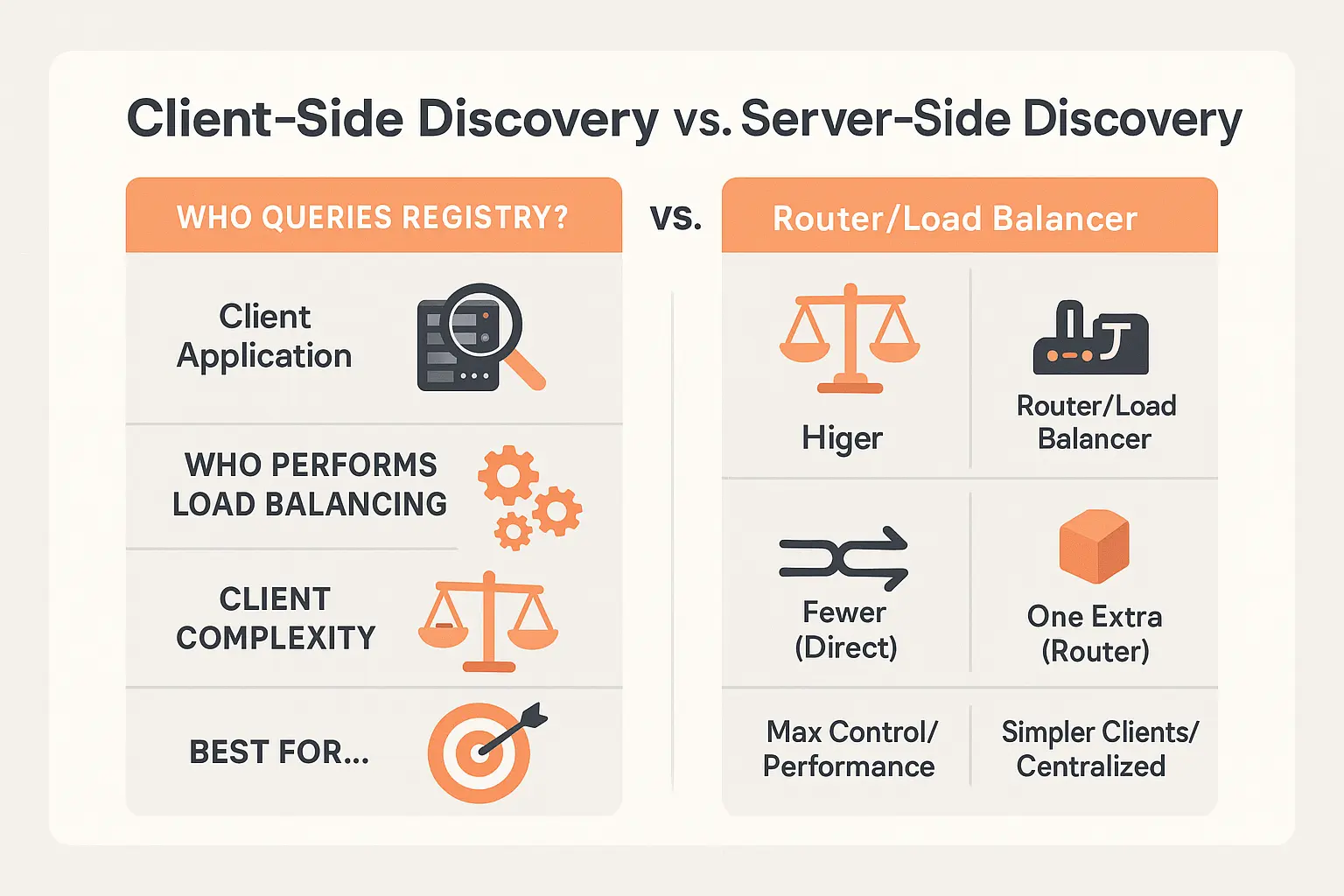
Which path should you take? If you need maximum control and have developer resources, client-side discovery shines. But if you want to keep things simple and standardized, server-side discovery might be your jam. Both beat the old-school manual setup where you’d have to update configuration files every time a service moved! 🚀
Protocols and real-world heroes: kubernetes & co.
Service discovery works through established protocols. Let’s explore the key players and how they simplify dynamic environments. Ready? 🚀
- DNS-SD: Uses DNS to locate services. Think “printers.nearby” instantly showing all network printers. Leverages SRV/TXT records for port numbers and metadata. For example, a service can advertise its availability with specific capabilities via TXT records.
- mDNS: Apple’s Bonjour uses this for zero-config setups. Connect to a smart speaker without typing an address? That’s mDNS in action. It’s ideal for local networks where no DNS server exists, broadcasting service availability directly.
- SSDP: Powers UPnP devices. Your smart TV finds streaming devices via network-wide “hello” broadcasts. While simple, it’s limited to local networks and lacks encryption—making it less secure for enterprise use.
- Others: SLP and LLDP exist but focus on niche uses. LLDP, for example, identifies physical network devices at the link layer, crucial for infrastructure monitoring.
Enter Kubernetes, the container orchestration leader. It makes service discovery effortless. How?
With Kubernetes, developers don’t have to worry about IP addresses anymore. They just use a service name, and the platform handles the magic of routing traffic correctly.
Kubernetes assigns services stable DNS names like my-svc.my-namespace. Even if pods change IPs, the platform routes traffic automatically. This is server-side discovery done right. Under the hood, CoreDNS—a plugin-based DNS server—manages dynamic environments, updating records as pods scale up/down.
Real-world example? .NET Aspire simplifies service discovery during development. It proves the concept works across frameworks—no complex setup needed. Developers get built-in tools to simulate dynamic service interactions without leaving their IDE.
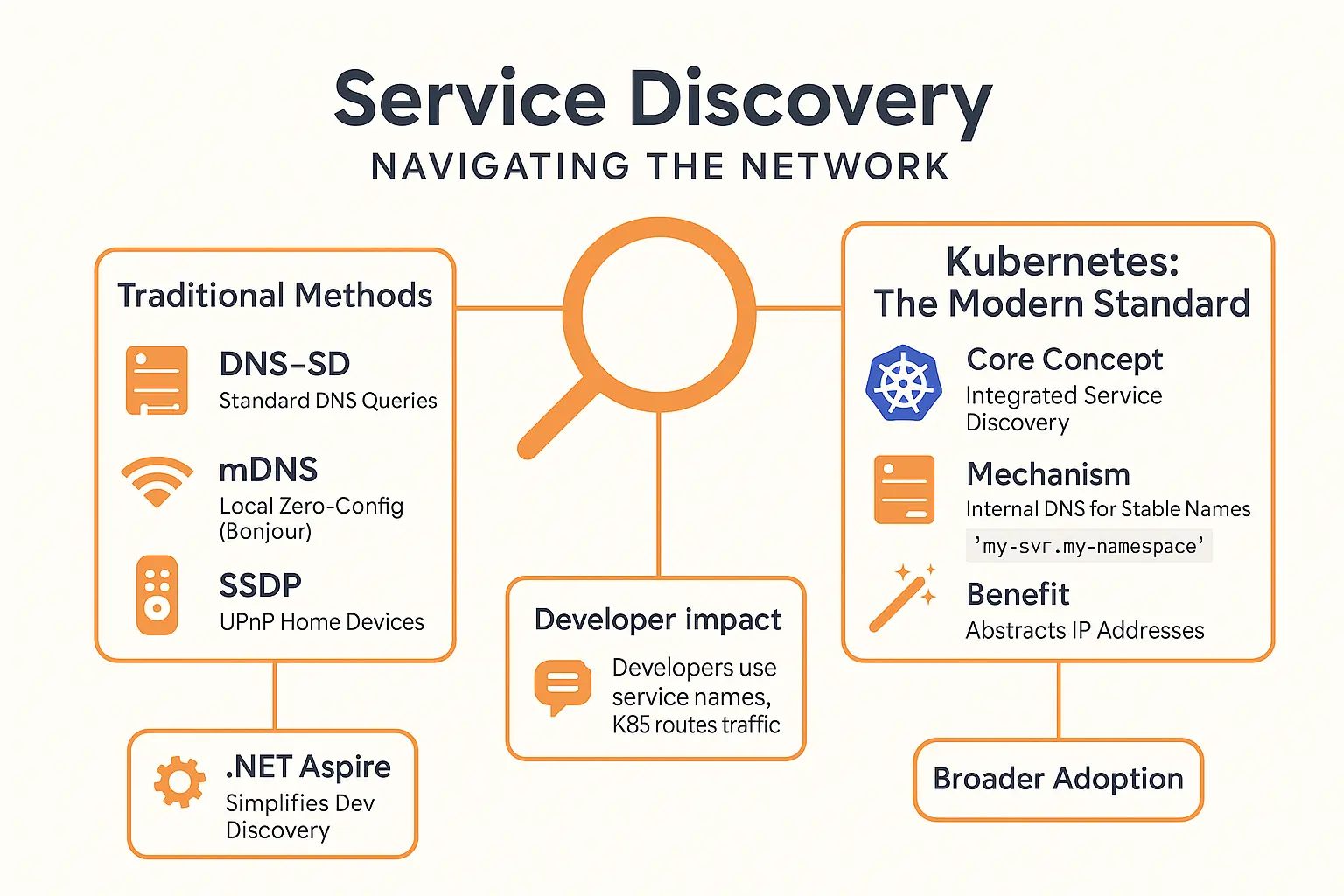
Why care? In dynamic environments with shifting IPs (like microservices), these tools cut configuration headaches. Whether scaling apps or printing from your phone, discovery protocols keep things connected seamlessly. Manual IP tracking becomes obsolete—no more spreadsheets or outdated configs.
The magic? You don’t need to track if a service runs on IP 10.0.0.42 today and 10.0.0.43 tomorrow. The system handles it. That’s modern service discovery at its best. 🌐
And the best part? These systems self-heal. If a Kubernetes pod crashes, traffic reroutes to healthy instances automatically. No downtime, no panic. That’s why discovery isn’t just convenient—it’s essential for scalable, resilient networks. 💪
Take Kubernetes’ health checks: they continuously monitor pods. A failed check removes the instance from the service’s DNS record, directing traffic elsewhere. This automated lifecycle management is why cloud-native apps thrive on platforms like Kubernetes.
In short, whether you’re using Apple’s Bonjour for smart home devices or Kubernetes for enterprise apps, these protocols let technology work quietly in the background. You focus on your task, while the system handles complexity. Isn’t that the dream? 🌟
Ready to embrace automation? Here’s how to start
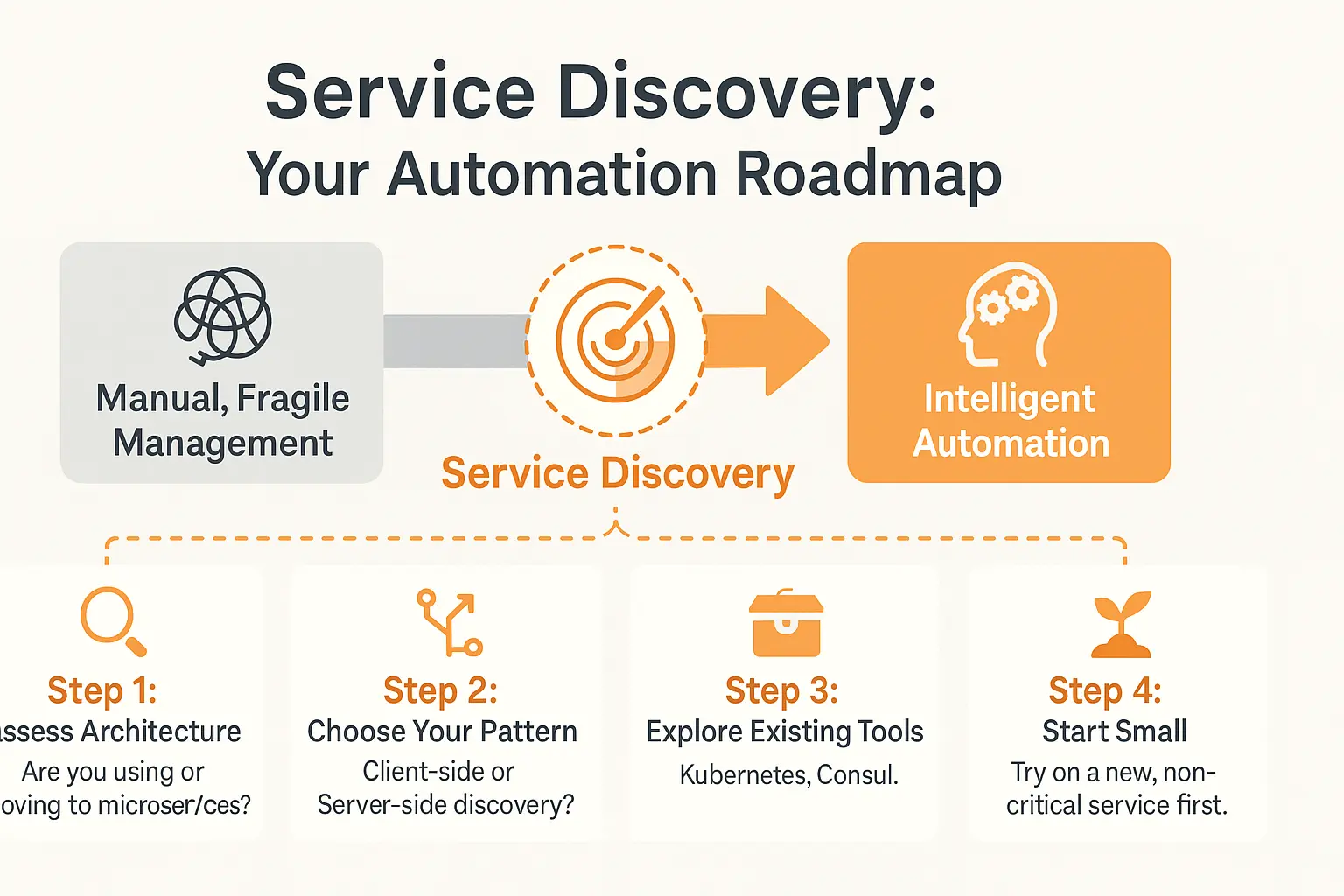
Service discovery is the backbone of modern systems. Imagine your network managing itself like magic, automatically tracking services as they appear/disappear. No more manual headaches. Think of it as your automation roadmap, guiding every service like a well-oiled machine. Dynamic environments, like Kubernetes clusters with ephemeral pods, thrive when services auto-register—eliminating the chaos of manual tracking.
- ✅ Assess your architecture: Are you using microservices? Dynamic environments thrive when services auto-register—like Kubernetes pods that spin up unpredictably. If your infrastructure changes hourly, this step is non-negotiable.
- ✅ Choose your pattern: Client-side (e.g., Eureka) gives control, while server-side (e.g., kube-proxy) simplifies client logic. Your choice depends on team expertise and system complexity.
- ✅ Explore existing tools: Use Kubernetes’ DNS-SD, HashiCorp Consul’s health checks, or Istio’s service mesh for traffic routing. Match tools to your use case. For example, Consul’s health checks prevent traffic from hitting failed services—think of it as a bouncer for your network.
- ✅ Start small: Test on a non-critical service first. Monitor failures or scaling bursts before rolling out to critical systems.
The best way to learn is by doing. Just like you can try a personalized story for free, start with a small project to see service discovery’s benefits. Positive feedback often happens fast—it’s like the customer testimonials you’d see in a product launch. Everything becomes… automatic.
Automation’s future is invisible and smarter. Developers focus on creating value, not error-prone configs. Systems adapt effortlessly, reducing downtime and human error. The road to effortless network management starts now—why not take the first step? 🚀
Service discovery isn’t just a technical detail—it’s the magic that lets modern apps scale, heal, and evolve. Ready to ditch manual chaos? Start small, pick your tools (like Kubernetes or Consul), and let automation handle the rest. 🚀 Try our free trial or see how others are already winning with it!
FAQ
Is Discover’s customer service available 24/7?
Yep, Discover offers 24/7 customer service! 🎉 Whether you’re dealing with a late-night billing question or a weekend emergency, their team is always on standby. You can reach them via phone, live chat, or even their mobile app. Pro tip: Their website has a treasure trove of self-service options too, so check those out first for quick fixes!
Who does the number 1-800-347-2683 belong to?
This is one of Discover’s official customer service lines! 📞 If you’re calling from the US or Canada, this 800 number connects you directly to their support team. Want to be extra sure? Just head to Discover’s official website and verify the number under their “Contact Us” section. Spoiler alert: It’ll match!
What’s the phone number for Discover card at 1-800-347-3072?
That number (1-800-347-3072) is another verified Discover customer service line! 🚀 Fun fact – Discover has multiple toll-free numbers depending on your needs. This one’s typically used for general cardholder support. Always double-check the number on your card’s back or Discover’s official site to avoid fake number scams!
Is Discover experiencing any issues right now?
Here’s the deal: You can check Discover’s real-time status at any time! 🔍 Visit their official website or social media pages for outage updates. If you’re having trouble reaching them, try the Discover app first – sometimes issues are specific to certain channels. Pro tip: If you’re in a time crunch, their AI chatbot might have workarounds while systems get fixed!
What are Discover’s customer service hours?
Let me make this crystal clear: Discover works non-stop! 🔄 Their customer service is available 24 hours a day, 7 days a week. Want specifics? Their phone lines are open 24/7, live chat runs from 8AM-11PM ET, and online tools work 24/7. Pro tip: Weekday mornings usually have shorter wait times if you’re calling about non-urgent matters.
Has Capital One acquired Discover?
Hold up – let’s set the record straight! 🚫 No way, José. While both are big names in finance, Capital One and Discover are totally separate companies. Fun history lesson: Discover was actually spun off from Morgan Stanley back in 2007. They might sometimes partner up for co-branded cards, but they’re definitely not the same company!
Who uses the number 800-347-4934?
That’s another of Discover’s official support numbers! 📲 This 800-347-4934 line handles various customer service needs. Quick heads-up: Some numbers might be location-specific or offer different support tiers (like fraud vs. general questions). Always check the number against Discover’s website to make sure you’re not calling any shady lookalikes!
How would you rate Discover’s customer service?
Let’s break it down: Most folks give Discover solid reviews! 😊 They’re known for quick response times, friendly reps, and that awesome $0 fraud liability. Some gripes include busy wait times during peak hours, but hey – that’s par for the course with big banks. Pro tip: Use their AI chat first for basic questions – it’s super fast and available 24/7!
Will Discover refund me if I’m a scam victim?
Great question! Here’s the good news: Discover has your back! 💪 If you report fraud quickly (ideally within 60 days), they’ll usually refund the charges. Quick action is key – the moment you notice something sketchy, hop on the Discover app or call them ASAP. Pro tip: Their Zero Liability Policy covers unauthorized purchases, but you gotta report them first!